After a purchase order (PO) leaves your ERP, the work really begins. A single missed supplier acknowledgment can idle machines, waste dock slots, and drive up labor costs. In Deloitte’s 2025 CPO survey, 64 percent of procurement chiefs named greater supply chain visibility as a top risk strategy, and top-quartile teams allocate up to 24 percent of their budgets to technology. This October 2026 guide compares the six leading procurement-automation platforms for manufacturers so you can keep every post-PO promise on track.
Quick definition
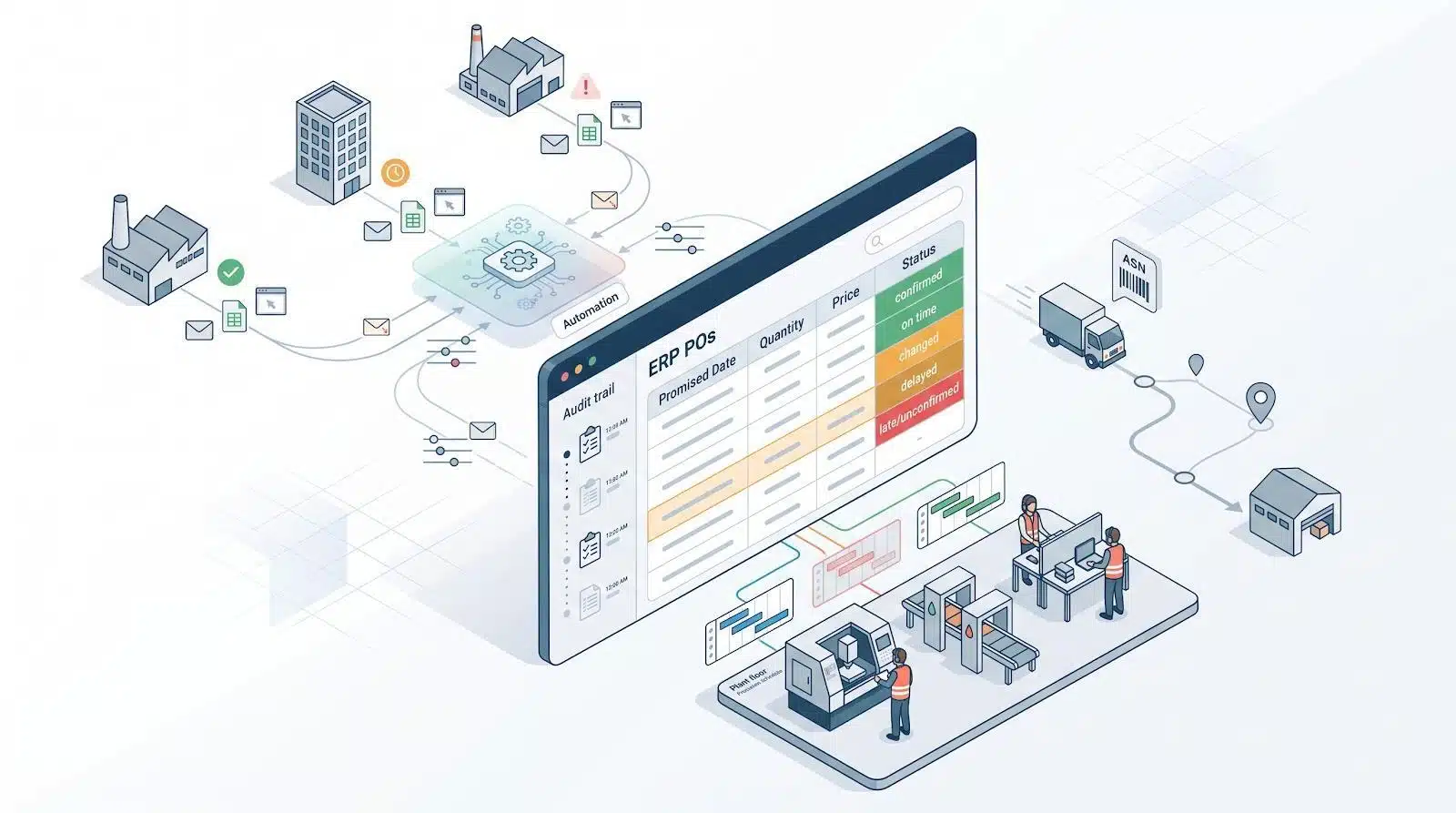
Post-PO procurement-automation software records supplier acknowledgments, flags price or date changes, chases late replies, tracks shipments, and writes every approved update, with a full audit trail, back into the ERP table fields.
Quick look: which tool fits where?
Want the shortlist? The table below matches each leading procurement-automation platform to the post-PO job it handles.
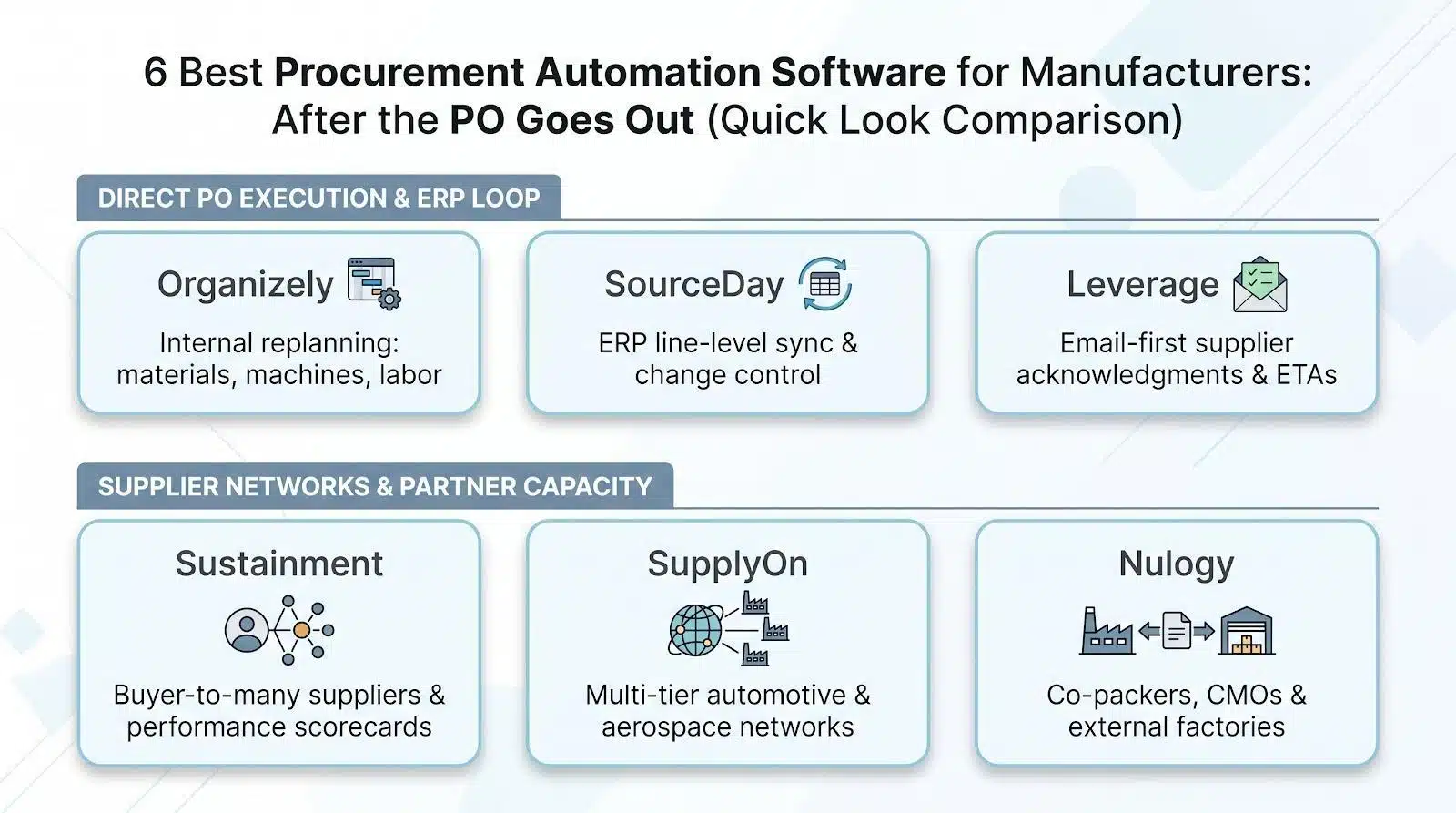
Tool | Best-for use case | Typical deployment |
Organizely | Re-balancing materials, machines, and labor when a shipment slips | Enterprise manufacturers |
SourceDay | Writing confirmed dates, quantities, and price changes back to the ERP | Mid-market to enterprise |
Leverage | Auto-email follow-ups and ETA capture from suppliers that work by email | Manufacturers and distributors |
Sustainment | Stretching one buyer across hundreds of suppliers with built-in scorecards | Mid-market to enterprise |
SupplyOn | Multi-tier automotive or aerospace collaboration (PO → ASN → receipt) | Large global enterprises |
Nulogy | Coordinating POs with co-packers, CMOs, and other external factories | Mid-market to enterprise brands |
How we chose the six
We kept only platforms that met four hard requirements for manufacturers:
- Direct-material focus. The tool must handle BOM-level parts and real production deadlines; requisition- or invoice-only products were excluded.
- Post-PO automation. Mandatory support for line-level acknowledgments, missing-response reminders, supplier-proposed changes, and ERP write-back.
- Practical adoption. The software has to sit alongside your current ERP and let suppliers reply by email, portal, or EDI. No single-channel bottlenecks.
- Public evidence. Every capability appears in help centers, case studies, or user reviews; we rejected claims without proof.
Six products met all four rules. The next sections explain why each one belongs in this guide to the best procurement automation software for manufacturers.
Tool 1: Organizely: best when one late part rewrites your whole plan
Website: www.organizely.io
Organizely’s AI agents watch more than email. The cloud platform links materials, equipment, and labor so it sees how a change in one area ripples through the rest.
When a supplier pushes a date, it drafts an updated plan and shows what moved, so your team can approve it.
Why it matters
A three-day delay on a $12 bearing can idle a CNC cell, leave a paint line underloaded, and waste paid labor. Organizely spots shortages and conflicts before work begins, turning that insight into coordinated purchasing, scheduling, and work plans for your team to review and approve.
Stand-out manufacturing strengths
- Materials: Connects demand, stock, inbound deliveries, and production requirements to highlight shortages early.
- Equipment: Checks capacity alongside materials before it proposes a production schedule.
- Labor: Keeps people, machines, and stock in sync, so the team knows what to work on next.
Choose Organizely when shared work centers, tight equipment calendars, and frequent priority shifts make manual replanning a daily headache. It works across your team and existing systems, planning from the sales, stock, and purchasing data you already have, and it drafts supplier follow-ups and purchase orders for your team to approve before anything goes out.
Tool 2: SourceDay: best when your ERP shows yesterday’s promises
Website: www.sourceday.com
SourceDay adds a cloud layer that syncs supplier commitments with your ERP in real time, no spreadsheet chasing required.
Why manufacturers pick it
- Captures every supplier confirmation, delay, or price change and writes the approved value back to the ERP table.
- Suppliers can reply through the channels they already use (no-login email, portal, or EDI). That flexibility lifts long-tail adoption without extra logins.
- Connects over 120,000 activated supplier nodes, with suppliers collaborating on 2.1 million purchase orders in 2025.
- In 2025, the network processed 5.7 million purchase order changes and handled $18 billion in direct-materials spend.
Stand-out features
- Line-level collaboration with automatic reminder cadence.
- Configurable rules let low-impact updates post automatically while exceptions wait for approval.
- Built-in scorecards turn every on-time hit or miss into supplier performance history.
Fit check
Choose SourceDay if stale delivery dates inside an otherwise solid ERP are your main constraint. It suits mid-market and enterprise manufacturers running thousands of open PO lines that need an auditable handshake between supplier promises and production planning.
Skip it when the bottleneck is internal capacity, labor balancing, or external-factory visibility. In those cases, Organizely or Nulogy fit better. Ask for a breakdown of connector fees, supplier seats, and transaction limits when you request a quote.
Tool 3: Leverage: best when email is still your supply-chain lifeline
Website: www.tryleverage.ai
Leverage reads the inbox so your team doesn’t have to. Its AI handles PO acknowledgments, ship dates, and delivery confirmations, then pushes real-time ETA updates directly into the ERP.
Why buyers pick it
- Built for manufacturers and distributors whose suppliers answer by email, with no supplier portal required.
- Automates reminders until every line is confirmed, then surfaces only late or changed promises.
- Pushes structured ETA data to the ERP so planners stop copy-pasting.
- Includes supplier performance measurement alongside order tracking.
Stand-out capabilities
- Supplier email replies are tracked in one place, so buyers see what is late without chasing.
- ETA updates flow into the ERP without manual data entry.
- A network of thousands of already-connected suppliers shortens onboarding.
Fit check
Choose Leverage when volume, not complexity, is the choke point for industrial distributors, job shops, or plants with lean procurement teams. In a demo, confirm how price changes write back to the ERP.
Tool 4: Sustainment: best when one buyer has to manage hundreds of suppliers
Website: www.sustainment.com
Sustainment automates the routine follow-ups: acknowledgments, delivery-date check-ins, and order-linked chat threads that normally consume a buyer’s day.
Why it matters
Suppliers are prompted automatically for acknowledgments, status changes, and date confirmations, so buyers step in only when judgment is needed and can cover more vendors.
Stand-out capabilities
- Order-centric messaging keeps every question tied to the exact PO line.
- Suppliers can work in a free portal or reply by email, so buyers decide how each vendor responds.
- Scorecards roll up on-time delivery, rejected quantities, and quality outcomes from every logged delivery.
Fit check
Choose Sustainment when constant emailing and spreadsheet updates slow you down, especially in regulated industries that need clean audit trails. Your ERP stays the financial system of record, and Sustainment runs alongside it as the coordination layer.
Tool 5: SupplyOn: best for multi-tier automotive and aerospace networks
Website: www.supplyon.com
SupplyOn acts as a shared operating system for global manufacturing networks. Purchase orders, confirmations, shipments, capacity data, and quality records all move across several supplier tiers in one place.
Why it matters
Automotive and aerospace plants schedule to the minute; a missed line item can stall final assembly. SupplyOn connects every step in that chain and flags deviations before they reach the line.
Stand-out capabilities
- Supports classic POs, JIT/JIS call-offs, vendor-managed inventory, and Kanban in the same workspace.
- A PO Deviation Cockpit highlights quantity and date changes, with visibility into shipments and goods receipt.
- A Capacity Management module helps you compare supplier capacity against demand.
- Extends into quality and finance workflows, creating one audit trail for the entire chain.
Documented impact
SupplyOn cites a 20 to 30 percent reduction in process cost per PO line, more than 50 percent less manual effort in procurement and goods receipt, and 80 percent faster data exchange with suppliers.
Fit check
Choose SupplyOn if you build cars, aircraft, or heavy equipment and must coordinate thousands of suppliers across countries and time zones. Budget extra time for supplier onboarding and cross-functional decisions; implementation touches IT, logistics, quality, and finance. For lighter email follow-up, SourceDay or Leverage lands faster.
Tool 6: Nulogy: best when partners, not plants, make your product
Website: www.nulogy.com
When production happens at a co-packer, you need visibility into their lines, labor, and inventory, not just your PO. Nulogy links your orders to the external factory’s capacity and BOM data so surprises surface before a pallet ships.
Why it matters
In one life-sciences deployment, Nulogy achieved 69 to 88 percent faster PO processing and cut inventory reconciliation time from 120 minutes to just 15.
Stand-out capabilities
- Shares real-time capacity and on-hand inventory with partners, removing blind spots between order and shipment.
- Synchronizes multi-level BOM revisions so both sides work from the same spec.
- Tracks production status and shipment milestones, which supports better OTIF performance.
- Shares BOM documents such as item specifications and compliance certificates with every partner.
Fit check
Choose Nulogy if contract manufacturing is strategic in CPG, food, beverage, or pharma, and recipe changes or regulatory audits require tight partner coordination. If you build everything in-house, SourceDay or Leverage can handle basic date confirmations more quickly. Partners connect through low-code and no-code integration, so plan time for data mapping.
Head-to-head: where each tool wins
The grid below distills the strengths documented in public sources. Use it to shortlist the best procurement automation software for manufacturers based on the gap you must close first.
Capability | Organizely | SourceDay | Leverage | Sustainment | SupplyOn | Nulogy |
Supplier acknowledgment | No | ✓ | ✓ | ✓ | ✓ | ◐ |
Automated follow-up reminders | ◐ | ✓ | ✓ | ✓ | ✓ | ◐ |
Supplier-proposed change capture | No | ✓ | ✓ | ✓ | ✓ | ◐ |
ERP write-back of approved updates | No | ✓ | ✓ | No | ✓ | ✓ |
Shipment / advance shipping notice (ASN) visibility | ◐ | ✓ | ✓ | ◐ | ✓ | ✓ |
Capacity view (internal or supplier) | ✓ internal | No | No | No | ✓ | ✓ |
Supplier scorecards | No | ✓ | ◐ | ✓ | ✓ | ✓ |
Legend: ✓ = supported in public evidence | ◐ = partial or verify in demo | No = no public evidence found
Source note: Checks are based on vendor help centers, product pages, and case studies reviewed in October 2026. Always ask vendors to demonstrate any ◐ feature live before you commit.
In short, SourceDay owns the line-level PO loop, Leverage cleans up email chaos, Sustainment adds performance scorecards, SupplyOn coordinates multi-tier networks, Nulogy surfaces partner capacity, and Organizely connects supplier dates to your internal materials, machine, and labor plans. Match those strengths to today’s pain point, then run a live demo to prove the fit.
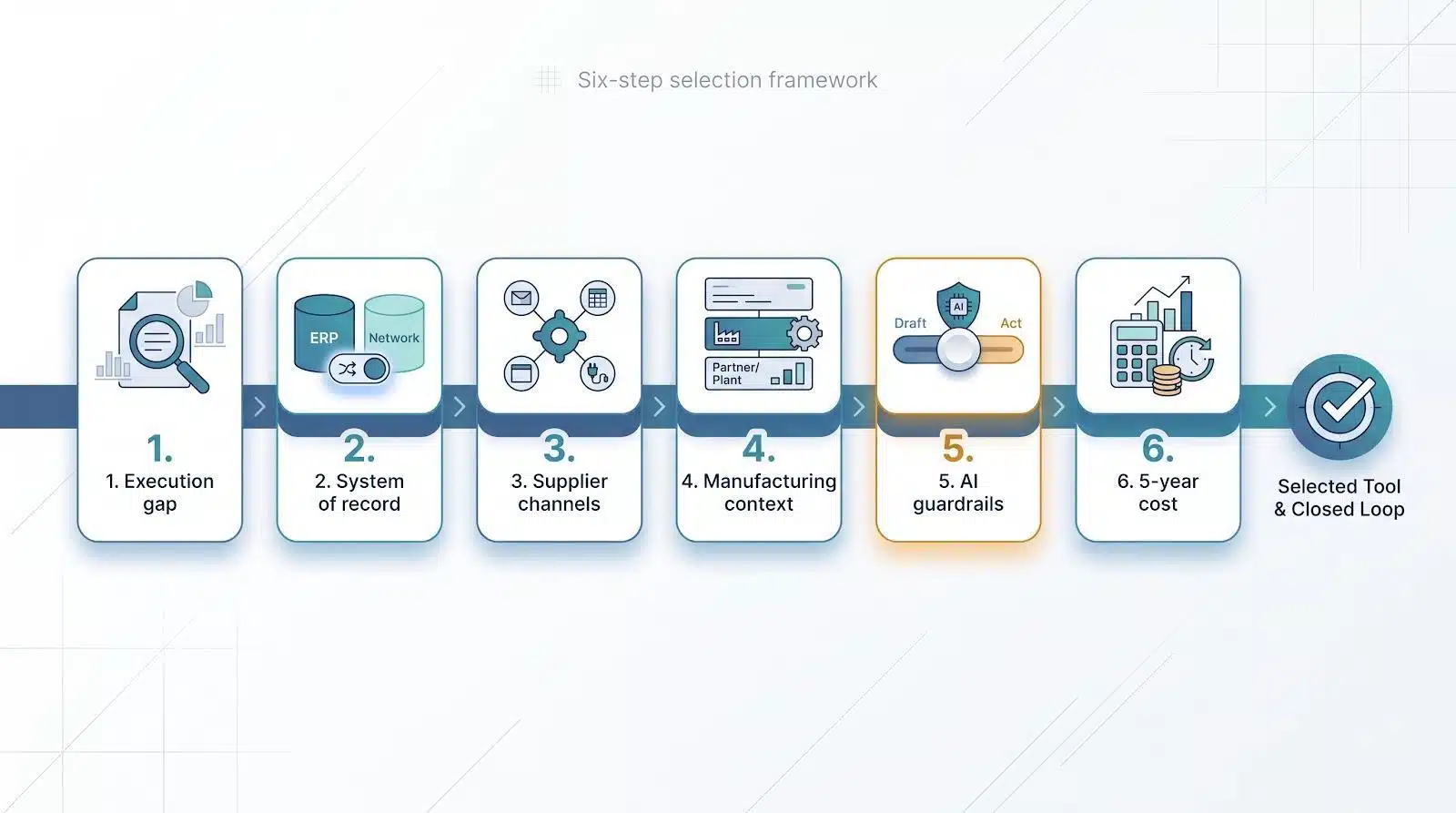
How to choose: a six-step playbook
Step 1: Identify the real execution gap
Audit the past 30 days of purchase orders:
- Count lines with no supplier acknowledgment.
- Flag every date, quantity, or price change the ERP never captured.
- List orders that shipped without an advance shipping notice (ASN).
- Note any production delay linked to missing or late material.
Next, calculate the share of late lines tied to each failure mode. If 80 percent of delays trace back to unconfirmed dates, acknowledgment discipline is your first priority. When downtime stems from confirmed dates that never reach the ERP, data synchronisation is the larger problem. If outsourced plants miss builds because you can’t see their capacity, partner visibility leads the list.
Rank each gap by business impact. That single page will steer tool selection; software that excels at chasing confirmations will not solve an external-factory capacity crunch.
With the gaps quantified, move to Step 2: deciding whether the ERP remains the record of truth.
Step 2: Decide whether the ERP remains the system of record
Ask one question: Where will the definitive buyer-supplier data live?
- Keep the ERP master. Finance, planning, and audit teams already trust those tables. Choose an overlay such as SourceDay or Leverage that writes approved changes (date, quantity, price) back into the existing PO lines.
- Shift to a shared network. Platforms like SupplyOn or Nulogy create a neutral workspace where every tier sees one canonical order, shipment, and quality history. This unlocks multi-company planning but adds connector mapping and data-governance effort.
Whichever path you pick, demand a live demo that completes this loop in under 10 minutes:
- Supplier proposes a date change in the new tool
- Buyer approves (or a rule auto-accepts)
- Updated promise, line history, and release write back to the ERP
If a vendor cannot close that loop, move on to the next contender.
Step 3: Match the way your suppliers talk
Map how each supplier tier communicates today before you choose a platform:
Channel | Typical supplier segment | Tools that support it out of the box |
Plain email | Long-tail or low-IT vendors | Leverage, SourceDay |
Spreadsheet or CSV file | Tier-2 component makers | SupplyOn |
Web portal | Mid-size strategic suppliers | SupplyOn, Sustainment |
Electronic data interchange (EDI) | High-volume automotive / aerospace partners | SupplyOn |
Application programming interface (API) | Tech-savvy partners, 3PLs | SupplyOn |
Low-code connector | Co-packers and contract manufacturers | Nulogy |
Action steps:
- Build a quick matrix of email, spreadsheet, portal, EDI, and API usage across your supplier base.
- Pick a platform that natively covers at least two of the dominant channels.
- Avoid forcing portal adoption when most acknowledgments still arrive by email.
Step 4: Decide how much manufacturing context the tool must understand
Post-PO control involves more than promised dates. A single line change can:
- Break the bill of materials (BOM)
- Idle a shared workstation
- Leave a co-packer without ingredients
- Violate a quality spec or labor-skill requirement
Build a checklist of data each platform must read:
Context layer | Typical data objects | When it matters | Tool examples |
Schedule line | PO line, promised date, quantity, price | Direct-material POs with stable routings | SourceDay |
External capacity | Partner line capacity, inventory, production milestones | Contract manufacturing or co-packing | Nulogy |
Internal constraints | Materials, machine capacity, team assignments | Plants with shared equipment or tight labor windows | Organizely |
Rule of thumb: the more variables that steer replanning, the less a generic PO tool will suffice. Match the software’s data model (materials, routings, capacity, quality, labor) to the real complexity of your floor or partner network, or you will return to spreadsheets to fill the gaps.
Step 5: Set clear guardrails for AI authority
Decide upfront how much autonomy the software gets:
Permission level | What the AI can do | When to use it |
Draft | Read supplier emails, extract changes, suggest updates, then wait for human approval | Starting point for most plants |
Act | Auto-apply changes that fall inside set tolerances (for example, ±1 day or ≤ $100) | After trust is proven on low-risk lines |
SourceDay supports rule-based auto-accept for low-risk changes, while Organizely drafts purchase orders and plans for your team to approve before anything is sent.
Bring these three policies to every demo:
- Fields: Which PO attributes (date, quantity, price) can update without approval?
- Thresholds: Dollar or day limits that trigger mandatory review.
- Audit: The log detail you need for each automated step.
If a vendor cannot show the full loop (proposal, rule check, audit record) in real time, continue your search.
Step 6: Price the full journey, not just the license
Build a five-year total-cost table before you compare quotes:
Cost bucket | Typical trigger | What to verify in writing |
Software license | Users, PO lines, modules | Renewal escalators and volume tiers |
ERP connectors | Per instance or environment | Fee for test and training systems |
Supplier onboarding | Partners, training hours | Whether long-tail vendors are charged |
AI consumption | Number of automated actions | Planned tiers as transaction volume grows |
Services | Implementation, data cleanup | Scope creep after phase-one go-live |
Internal labor | IT, security, change management | Extra shifts for supplier training |
Premium support | 24/7 or dedicated CSM | Cost after year one |
Keep in mind that adding a second plant or a large supplier base can raise the initial quote sharply. Also double the vendor’s “weeks-to-go-live” estimate if you need supplier change management across multiple shifts.
Run the math across five years; the lowest annual list price often lands mid-pack once hidden costs surface.
Give every vendor the same “complex PO” demo
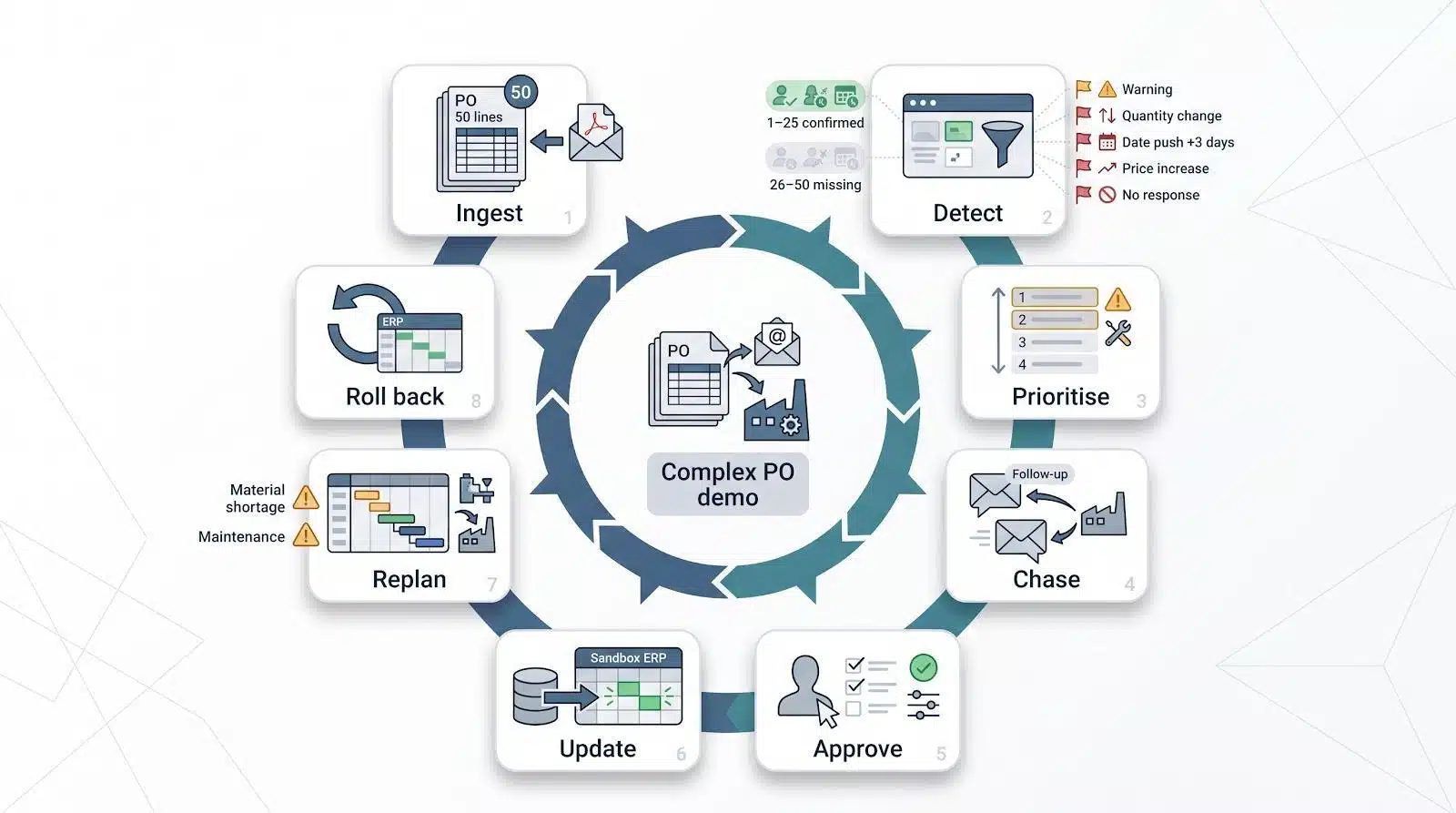
Copy this scenario into every demo request. A capable platform should complete the full loop in one live session: ingest → detect → prioritise → chase → approve → update → replan → roll back.
Test data
- 50-line direct-material PO with multiple releases
- Supplier email: confirms lines 1 to 25, ignores 26 to 50
- PDF attachment: quantity change on line 17
- Email body: pushes line 25 out by three days
- Price increase on line 32
- No response on line 44
- Supplier will not use a portal (email only)
Operational curveballs
- Material shortage now risks two production jobs
- A breakdown takes one critical workstation offline
- Every accepted change must write back to a sandbox ERP, with a complete audit trail
Ask the vendor to work through the list live, with no sanitised data and no pre-baked scripts. A strong tool should close the loop in under 20 minutes and leave you with a clean ERP log.
Red flags to spot during the demo
During the demo, end the conversation if the vendor:
- Calls auto-generated emails an “autonomous agent.”
- Cannot edit at line level; header-only changes mask risk.
- Shows changes in its UI but leaves the ERP untouched.
- Lacks a documented rule set for buyer-supplier data conflicts.
- Charges suppliers to log in; adoption collapses when vendors pay.
- Provides no audit trail of AI actions or approval overrides.
- Bundles connectors or onboarding into vague “professional services.”
- Quotes outcome percentages without time frame, baseline, or customer name.
Ask each vendor to demonstrate a live example for any item that concerns you. If you see two or more gaps, choose a different provider.
Build an ROI model your CFO will trust
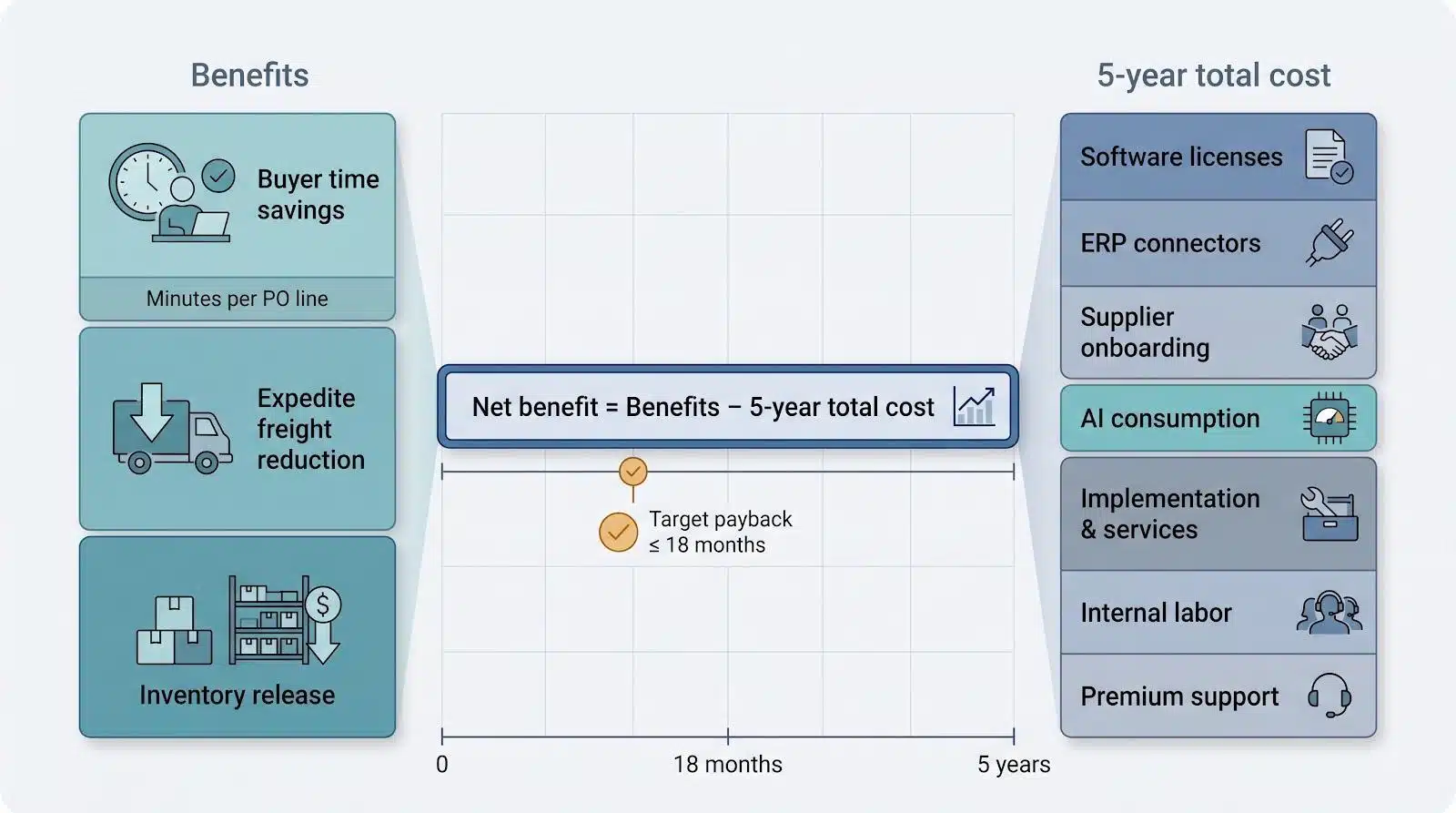
- Establish the workload.
- Track buyer minutes per open PO line, from first nudge to final receipt.
- Multiply by annual line volume and fully loaded hourly labor cost.
- Quantify the fallout.
- Expedite freight paid last quarter.
- Production hours lost to late parts.
- Buffer inventory held only because supplier dates drift.
- Model improvement.
- Offset with five-year total cost (software, connectors, onboarding, support, internal labor).
- Calculate the result.
Net benefit = (Time savings + Freight savings + Inventory release) minus Total cost
- Target a positive NPV and the payback period your finance team already uses for capital projects.
Bring it home
Choosing the best procurement automation software for manufacturers is not about flashy dashboards; it is about closing the loop between supplier promises and the rhythm of your plant.
Run the playbook you have just read: audit last month’s POs, pinpoint the execution gap, decide whether the ERP stays the system of record, map supplier channels, test context depth, set AI guardrails, and price the full journey. Use the “complex PO” demo to compare tools head-to-head, then stack each vendor’s ROI math against five-year ownership cost.
Do that homework now, and the next time a supplier shifts a date you will spot the risk, adjust the plan, and keep the line moving without scrambling.