Bad data decisions cost companies millions, and most start with a poorly planned warehouse. If your reports are slow, your numbers don’t match, or your team can’t agree on a single metric, the problem likely goes back to how the warehouse was designed.
This blog covers the full process of data warehouse design, from gathering business requirements and evaluating sources, to modeling tables, building pipelines, and validating outputs.
You’ll walk away with a clear, step-by-step understanding of what to build and why. So, where does it all go wrong, and how do you get it right from the start?
Define Business Requirements and Reporting Goals
Before touching any tool or technology, you need to know what the warehouse must solve. Start by asking: What decisions will this data support? Who will use it, and how often?
Here’s what to define upfront:
- The KPIs and reports that the business needs
- Who the end users are, analysts, executives, or operations teams
- How often does data need to be refreshed, daily, hourly, or near real-time
- How far back does historical data need to go
Analytical systems are fundamentally different from transactional databases. A transactional system is built to record individual events fast.
A warehouse is built to query across millions of records quickly. The single most common failure in data warehouse design? Building the architecture before knowing what the reports need to show.
That leads to mismatched schemas, missing data, and expensive rework.
Identify and Evaluate Data Sources
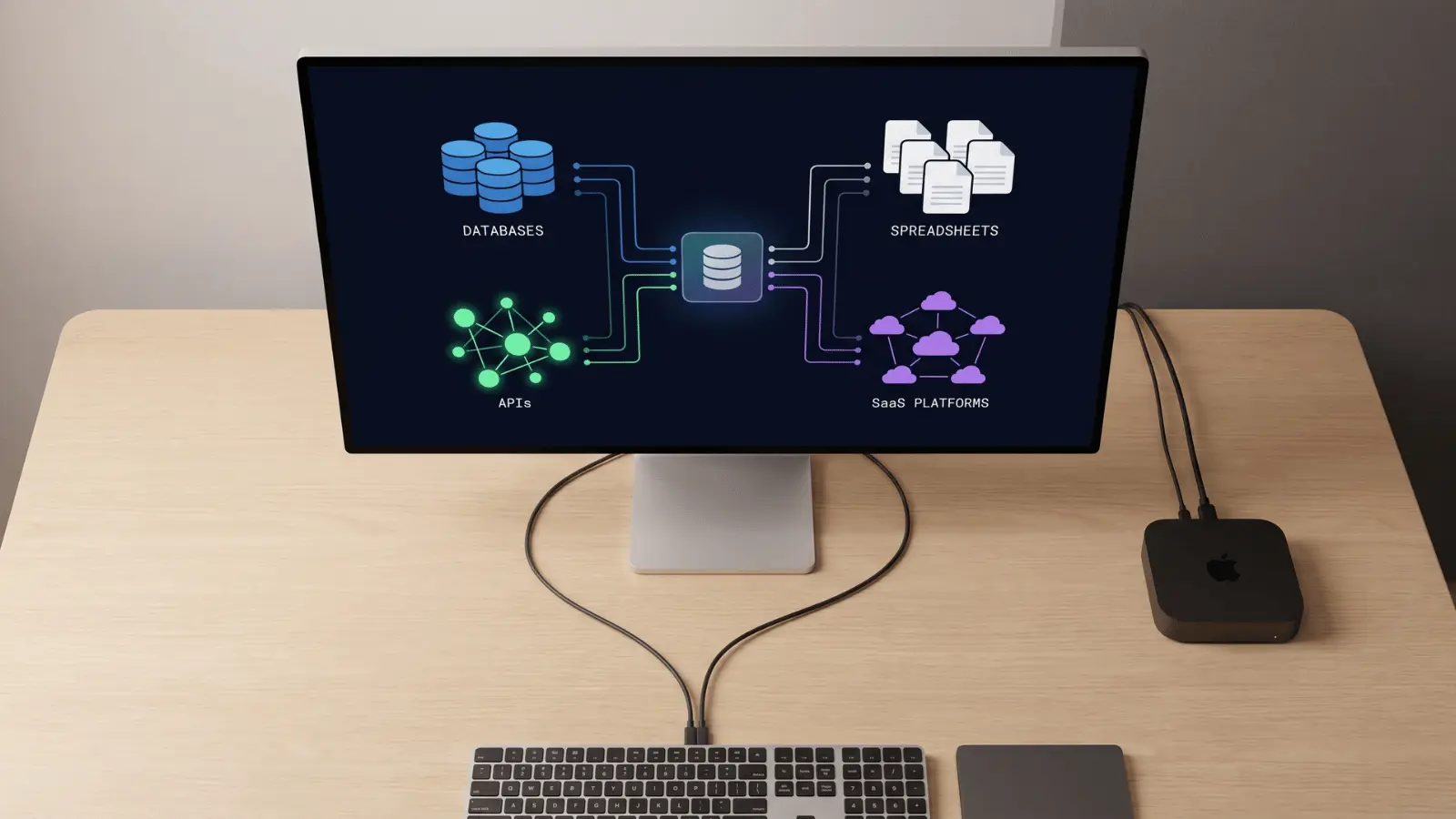
Once you know what you need, find out where the data lives. Data rarely comes from one place. Most organizations pull from databases, SaaS platforms, APIs, flat files, and spreadsheets, all at once.
Map each source and evaluate it for:
- Completeness: Are there missing fields or gaps in history?
- Consistency: Does the same concept mean the same thing across systems?
- Duplication: Are records appearing more than once?
- Refresh frequency: How often does the source update?
This step matters more than most teams realize. Inconsistent source definitions are one of the top reasons reporting breaks.
If “revenue” means something different in your CRM versus your billing system, your warehouse will reflect that confusion.
Choose the Right Data Warehouse Architecture
With your requirements and sources defined, you can now pick an architecture that fits your workload. Here’s a quick look at the main options and when they make sense:
Central Warehouse vs. Data Marts
A central warehouse holds all your data in one place. Data marts are smaller, focused subsets, often by department. You can have both, with marts built on top of a central warehouse.
Layered Data Structure
Most modern warehouses use three layers:
- Raw layer: data lands here exactly as it comes from sources
- Cleaned layer: data is standardized, deduplicated, and fixed
- Business-ready layer: data is modeled and ready for reports
Some architectures add a staging area before the raw layer, a temporary landing zone where data arrives before any processing.
It’s useful when source systems push data in bulk formats that need parsing before storage, or when you need an audit trail of exactly what arrived and when.
Cloud vs. On-Premise
Cloud warehouses (like BigQuery, Redshift, or Snowflake) favor ELT over traditional ETL. That means raw data is loaded first, then transformed inside the warehouse, which is faster and more scalable.
Avoid overcomplicating the architecture for small workloads. A simple two-layer setup is often enough for early-stage teams.
Kimball vs. Inmon: Choosing Your Design Philosophy
These are the two dominant schools of data warehouse design, and they produce meaningfully different architectures.
Kimball (bottom-up): Build data marts first; one for sales, one for finance, one for marketing, then integrate them over time. Teams get working reports faster, which makes it the more common choice for smaller orgs or teams that need to show value quickly. The tradeoff is that governance gets harder as the number of marts grows.
Inmon (top-down): Design the central warehouse first, normalized and fully integrated, then build marts on top of it. Initial build time is longer, but the resulting architecture is cleaner and easier to govern at scale. Better suited for enterprises with complex, cross-functional reporting requirements.
A practical default: if your team is small and timelines are tight, start Kimball. If you’re building for a large organization with multiple departments that need consistent shared metrics, Inmon’s centralized foundation pays off later.
Design the Data Model
This is the structural core of your warehouse. How you model data determines how fast and how reliably it answers questions.
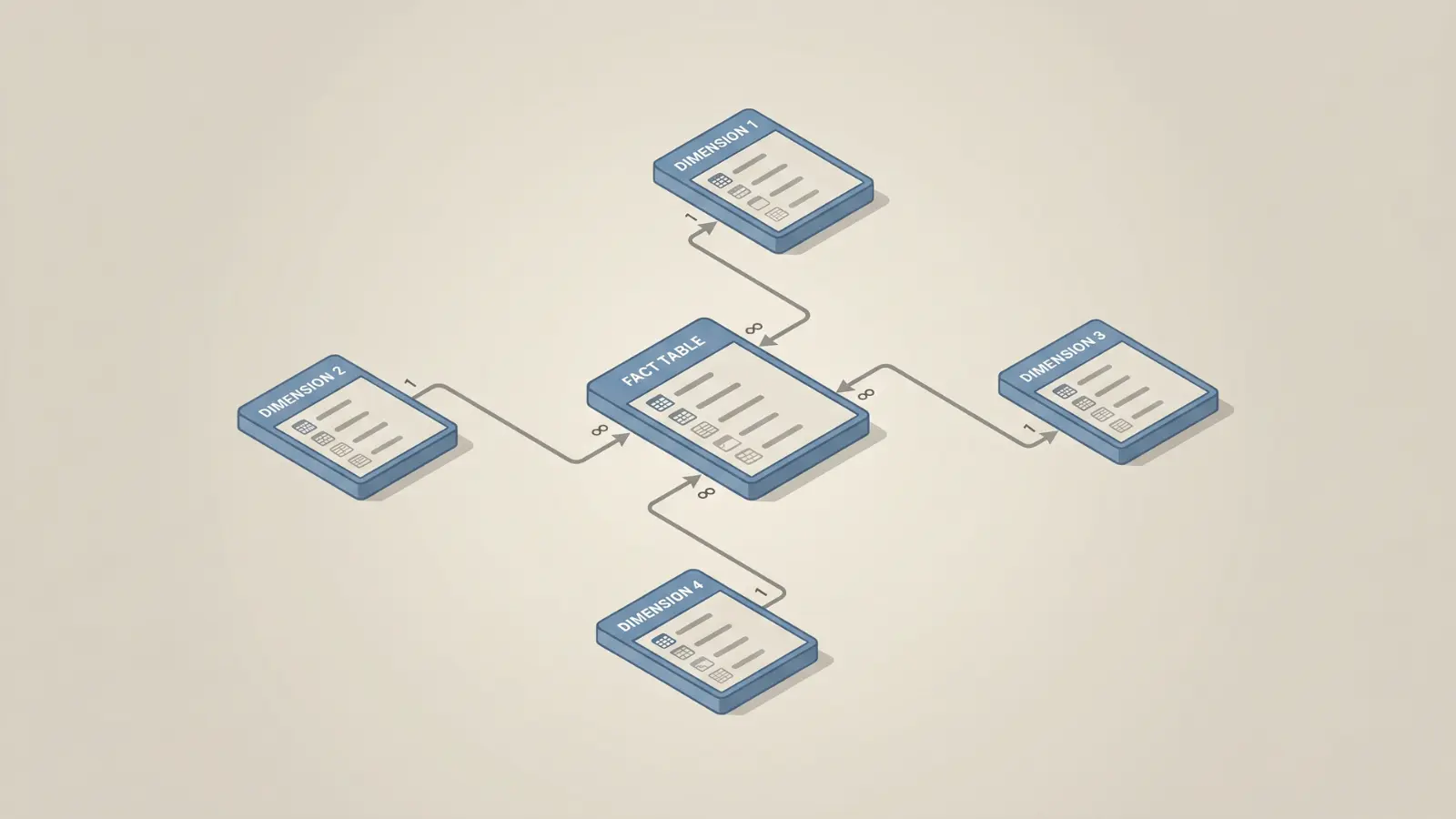
Most warehouse models are built around facts and dimensions, a pattern called dimensional modeling. It’s purpose-built for analytics queries.
Fact Tables
Fact tables store measurable events, sales, clicks, orders, and transactions.
Every row represents something that happened. Every column is either a metric or a foreign key linking to a dimension.
Two types of measures to know:
- Additive measures: can be summed across any dimension (e.g., revenue, units sold)
- Non-additive measures: can’t be simply summed (e.g., ratios, averages, distinct counts)
Before building a fact table, define its grain. The grain is the most atomic level of data the table stores, one row per what? One row per order? Per order line? Per day per customer?
Getting the grain wrong causes duplicate metrics quietly, and at scale. It’s also one of the hardest errors to fix after data is already in production.
Dimension Tables
Dimension tables store descriptive attributes, customer name, product category, region, sales rep. They give context to the numbers in your fact tables.
One key concept: Slowly Changing Dimensions (SCDs)
Attributes change over time. A customer moves cities. A product gets recategorized. SCDs define how you handle that history:
- Type 1: overwrite the old value (no history kept)
- Type 2: add a new row with the updated value (full history preserved)
- Type 3: add a new column for the previous value (limited history)
Type 2 is the most widely used. It preserves full history without losing the ability to filter by current values; critical for any report that needs to show what a customer’s region or product’s category was at the time of a transaction, not just what it is today.
Star Schema vs. Snowflake Schema
In a star schema, dimension tables connect directly to the fact table. It’s simple, fast, and easy to query.
In a snowflake schema, dimensions are normalized into sub-tables. It saves storage but adds query complexity.
For most analytics use cases, a star schema is the better choice. Snowflake schemas often slow down reporting without a meaningful benefit.
Build the ETL or ELT Pipeline
Your pipeline is what moves data from source systems into the warehouse. It needs to be consistent, reliable, and documented.
ETL vs. ELT: What’s the difference?
- ETL (Extract, Transform, Load): data is transformed before it enters the warehouse
- ELT (Extract, Load, Transform): raw data loads first, then transforms inside the warehouse
Cloud warehouses favor ELT because compute is cheap and transformation inside the warehouse is fast and auditable.
Two loading strategies:
- Full load: replace all data on every run. Simple but slow for large datasets.
- Incremental load: only load new or changed records. Faster, but requires careful logic to avoid gaps or duplicates.
Transformation logic must be consistent across every pipeline run. A common failure mode: a filter condition gets updated in one pipeline but not another, and two dashboards pulling from the same source start returning different totals.
Nobody changed the reports. The numbers just quietly diverge. That’s silent pipeline drift, and it’s one of the harder problems to diagnose after the fact.
Document every transformation rule. If it’s not written down, it will eventually cause a disagreement between teams.
Optimize Performance and Security
A warehouse that works on day one may struggle at scale. Building in performance and governance early prevents problems later.
Performance:
- Partitioning: split large tables by date or another high-cardinality key so queries scan less data
- Clustering: physically order rows by common filter columns
- Large fact tables benefit most from both strategies
Security and governance:
- Use role-based access control (RBAC), analysts shouldn’t have write access; executives don’t need raw data
- Establish naming conventions for tables, columns, and metrics before teams start building
- Document all data assets, including what they represent, where they come from, and who owns them
Poor governance quietly destroys trust in analytics. When different teams get different numbers for the same metric, they stop trusting the warehouse and go back to spreadsheets.
Connect BI Tools and Validate the Warehouse
The warehouse is only useful if it connects to the tools people actually use. Most teams connect a BI tool like Tableau, Power BI, or Looker.
These tools query the warehouse directly, so what you model upstream shows up in every dashboard downstream.
Before connecting BI tools, validate the data:
- Compare row counts against source systems
- Cross-check key metrics against known totals
- Run sample queries and verify results manually
Create semantic views or layers in the warehouse to make it easier for BI tools to connect. These views translate raw column names into business-friendly labels and pre-join common table combinations.
Set up ongoing monitoring for:
- Pipeline failures and delays
- Schema changes in source systems
- Metric drift, when numbers shift unexpectedly without a known cause
One of the most damaging mistakes in data warehouse design is launching dashboards built on unvalidated data. Once users spot an error, trust erodes fast and takes a long time to rebuild.
Common Data Warehouse Design Mistakes
Even well-planned warehouses run into problems. Most failures come back to a handful of repeated mistakes.
Here are the ones that cause the most damage:
- Using normalized schemas for analytics: these are designed for write speed, not read performance; they slow down analytical queries significantly
- Undefined fact table grain: without a clear grain, joins create duplicates, and metrics inflate silently
- Ignoring source data quality: dirty source data doesn’t clean itself; problems compound as data moves downstream
- Building real-time pipelines without a business case: real-time is expensive and complex; most reports only need daily or hourly refreshes
- Inconsistent metric definitions: if “active user” means different things in different dashboards, teams stop trusting the numbers and go back to building their own spreadsheets
Each of these is avoidable with upfront planning. Most of them stem from skipping the requirements and modeling stages.
Step-by-Step Data Warehouse Design Checklist
Use this checklist to track progress through your implementation.
- Define business goals: identify KPIs, users, and reporting needs
- Audit data sources: map all sources, assess quality, and define refresh frequency
- Choose architecture: decide on layers, cloud vs on-premise, and warehouse vs mart structure
- Design fact and dimension tables: define grain, choose schema type, and model SCDs
- Build ETL/ELT pipelines: implement loading strategy, document transformations
- Optimize performance and security: apply partitioning, set RBAC, enforce naming standards
- Connect BI tools: build semantic views, configure tool connections
- Validate and monitor: check row counts, cross-check metrics, set up pipeline alerts
Conclusion
A well-designed data warehouse gives your team one reliable place to find answers. The key is working through each layer carefully, requirements first, architecture second, modeling third.
Skipping steps early always costs more time later. Start with clarity on what the business needs, and the technical decisions become much easier to make.
The steps covered here — requirements, architecture, modeling, pipelines, validation — build on each other. Getting the early stages right makes every downstream decision easier. Start with your reporting goals, and the technical choices will follow from there.
Frequently Asked Questions
What is the difference between a data warehouse and a data lake?
A data warehouse stores structured, query-ready data for reporting. A data lake stores raw, unprocessed data in any format, including unstructured files and logs.
What is the Kimball vs Inmon approach to data warehouse design?
Kimball builds data marts first, then integrates them. Inmon designs a central warehouse first, then creates marts. Kimball is faster; Inmon offers stronger governance.
How long does it take to design a data warehouse?
Small warehouses take a few weeks. Mid-size ones take 2–4 months. Enterprise-level builds can take 6–12 months, depending on source complexity and stakeholder alignment.
What is an Operational Data Store (ODS) and how is it different from a data warehouse?
An ODS holds current, frequently updated data for operational use. A data warehouse stores historical data for long-term reporting and trend analysis.