Managing multiple social media accounts is part of everyday work for agencies, social media managers, affiliate teams, e-commerce businesses, and brands. You might be handling different client profiles, regional accounts, or separate accounts across Instagram, Facebook, TikTok, X, Reddit, and other platforms.
The challenge starts when several accounts connect through the same IP address, suddenly appear in different locations, or share the same browser or device environment. These patterns can link accounts together and increase the risk of security checks, restrictions, or bans.
Managing multiple accounts is not just a scheduling problem. It is also an infrastructure problem. A well-planned setup combines separate account environments with consistent network connections, and this is where mobile proxies become an important part of the workflow. By routing connections through real mobile carrier networks, they give teams greater control over the IP and location each account uses.
TL;DR
● Social media platforms can connect accounts through signals such as IP addresses, locations, browser or device environments, login patterns, and account activity.
● A stable network setup matters. Frequent location changes, unsuitable IP types, or many unrelated accounts sharing the same connection can increase the risk of verification checks and restrictions.
● Mobile proxies route traffic through real mobile carrier networks, making them well suited to social media workflows where consistent mobile network access and location control matter.
● A proxy only controls the network layer. Separate account environments, consistent sessions, secure credentials, sensible activity patterns, and platform rules still matter.
● CyberYozh App provides LTE/5G mobile proxies with unlimited traffic, location options, and IP management, which can be combined with anti-detect browsers or cloud phones to build a more controlled multi-account setup.
Why Managing Multiple Social Media Accounts Becomes Risky
Managing two or three social accounts is usually straightforward. The setup gets more complicated when that turns into 20 client profiles, several regional accounts, or a larger operation spread across different platforms.
At that point, keeping track of passwords and content calendars is only part of the problem. Each login also carries technical signals. The IP address, location, browser session, device environment, and activity around the account can all contribute to the picture a platform sees.
Multiple accounts connecting from the same IP
If you manage several accounts from one office, laptop, server, or internet connection, they may all appear under the same public IP address. That is not automatically suspicious. Plenty of legitimate users share an IP.
The issue is context. If a large number of unrelated accounts repeatedly connect through the same address and show similar activity, that shared connection becomes one more signal tying those sessions together.
This matters even more for agencies. Ten accounts belonging to ten different clients should not necessarily have identical network histories simply because one person manages them.
Frequent IP and location changes
Changing an IP is not always a problem either. Mobile networks do it naturally. What can become messy is an account whose network history makes little sense.
Imagine an account connecting from Germany in the morning, the US a few hours later, and another country that evening. Even without knowing exactly how a platform weighs those signals, the access pattern is inconsistent.
For multi-account work, consistency is usually more useful than constant rotation. If an account is supposed to operate from a particular market, keeping its network location reasonably stable gives you a cleaner setup.
Using the wrong type of proxy
Not every proxy gives a social media account the same kind of connection.
Datacenter proxies use IP addresses associated with hosting providers and data centers. They are generally fast and useful for many automation and data-heavy tasks, but the network does not look like a normal home or mobile internet connection.
Residential proxies use IP addresses associated with consumer ISPs, while mobile proxies route connections through mobile carrier networks. That distinction matters for social media because platforms such as Instagram, TikTok, and Facebook receive a huge amount of ordinary traffic from mobile networks.
That does not mean a mobile or residential IP makes an account safe from restrictions. It simply gives you a different network environment. Account history, device signals, behavior, content, and platform rules still count.
Account and browser environments getting mixed
Changing the IP while leaving everything else mixed together only solves one part of the problem.
Browsers retain cookies, local storage, login sessions, and other data. Devices and browsers also expose characteristics that can help websites recognize an environment. If you keep jumping between unrelated accounts inside the same setup, those accounts may still share signals even though their IP addresses are different.
This is why multi-account setups often pair proxies with separate browser profiles, anti-detect browsers, cloud phones, or dedicated devices. The proxy handles the network connection. The separate environment handles the session and device side.
They solve different problems.
Scaling activity too quickly
A new account does not need to behave like an established marketing channel on day one.
Creating a profile and immediately pushing a high volume of posts, follows, messages, comments, or other repetitive actions creates a very different activity pattern from normal gradual use. The same applies when an existing account suddenly jumps from occasional activity to heavy automation.
There is no universal “safe” number of actions that applies across every platform and account. A better approach is to scale activity gradually and work within the rules and limits of the platform you are using.
Repeating the same behavior across every account
Technical isolation will not help much if 30 accounts behave like copies of one another.
Posting identical captions at the same time, following the same profiles in the same order, sending the same messages, or running every account on an identical schedule creates patterns at the activity level.
This is an easy mistake to make when automation enters the workflow. The goal should not be to make automated activity “look human.” It should be to avoid turning legitimate accounts into clones. Different clients, brands, regions, and audiences naturally have different content, schedules, goals, and ways of interacting.
A good multi-account setup reflects those differences rather than trying to run every account through the exact same routine.
How Social Media Platforms Can Connect Activity Across Accounts
An IP address is only one part of what a social media platform can see. When an account logs in and starts using the platform, several signals can contribute to how that session is recognized:
● IP address and network: The IP used to connect and the type of network behind it, such as mobile, residential ISP, or datacenter.
● Location: The country, region, or city associated with the connection. Large or frequent location changes can create an inconsistent login history.
● Cookies and sessions: Stored cookies, login sessions, local storage, and other browser data can remain connected to an account even after its IP changes.
● Browser and device characteristics: Operating system, browser configuration, language, screen settings, device type, and other technical characteristics can help distinguish one environment from another.
● Login patterns: When and where accounts are accessed, how often they switch environments, and whether many accounts repeatedly use the same setup.
● Account activity: Posting, following, messaging, commenting, and other actions can form recognizable patterns, especially when many accounts perform the same actions at similar times.
The key point is simple: changing an IP does not change everything else. A new IP does not automatically replace cookies, browser characteristics, device information, login history, or the way an account behaves.
A mobile proxy handles the network side of the setup. For larger multi-account workflows, it can be paired with separate browser profiles, anti-detect browsers, cloud phones, or other isolated environments. Account activity still needs to make sense for the individual account and follow the rules of the platform being used.
How to Reduce the Risk of Bans when Managing Multiple Social Media Accounts
There is no single setting that makes a social media account immune to restrictions. A safer multi-account setup comes from keeping the network, device environment, login history, and account activity consistent instead of changing everything from session to session.
Keep each account in a separate environment
Start by separating accounts that do not belong in the same environment. Depending on the platform and workflow, this could mean using:
● Separate browser profiles for web-based account management
● An anti-detect browser for isolated browser environments
● A cloud phone for mobile-first platforms such as Instagram and TikTok
● Separate physical devices when only a small number of accounts need to be managed
Cloud phones are particularly useful when the workflow needs an Android environment rather than another browser profile. Each cloud phone can maintain its own apps, sessions, and device environment, while a mobile proxy provides the network connection behind it.
The two have different jobs. The cloud phone separates the mobile environment. The mobile proxy controls the IP and network connection.
Give accounts a consistent network identity
Constantly changing an account’s connection is not necessarily safer. In many cases, consistency is the better approach.
If an account normally operates in one market, avoid unnecessary jumps between countries, regions, or completely different network types. The same applies to switching between mobile, residential, datacenter, and home connections without a reason.
For accounts that need longer sessions, keep the network setup stable rather than rotating the IP simply because the option is available.
Use mobile proxies for social media workflows
Mobile proxies route traffic through IP addresses associated with real mobile carrier networks. That makes them a natural option for social media workflows, particularly for platforms where a large share of normal usage already comes from smartphones and mobile networks.
They can also give teams more control over:
● The network used by each account or environment
● The location of the connection
● When an IP is changed
● How connections are assigned across browser profiles or cloud phones
● High-traffic workflows involving images, video, feeds, uploads, and ongoing account management
A mobile proxy does not replace account isolation. Pairing it with a separate browser profile or cloud phone creates a more complete setup because both the network and account environment can be managed independently.
Build account activity gradually
A newly created or recently recovered account should not suddenly behave like an established account with months of activity behind it.
Avoid jumping straight into heavy posting, following, messaging, commenting, or automation. Start with normal account setup and usage, then increase activity as the account becomes established.
There is no universal number of daily actions that guarantees an account will remain unrestricted. Platform limits, account history, account type, and the activity itself can all affect what happens.
Avoid identical activity across accounts
Isolation should extend beyond IP addresses and devices.
If every account publishes the same content at the same time, follows the same users, sends identical messages, and performs actions on the same schedule, separating their technical environments only solves part of the problem.
Client, regional, brand, and product accounts usually have different audiences and purposes anyway. Their content and workflows should reflect that.
Use official account-management features where appropriate
Not every account needs its own completely independent login workflow.
When a platform provides official tools for teams, agencies, or businesses, use them where they fit the job. Role-based access, delegated permissions, Meta Business tools, and similar features can reduce unnecessary credential sharing and make it clearer who has access to each account.
For larger operations, these tools can sit alongside cloud phones, isolated browser profiles, and mobile proxies rather than competing with them. Each solves a different part of multi-account management.
Why Mobile Proxies Are a Strong Fit for Multi-Account Social Media Management
The network behind a proxy matters when social accounts are part of the workflow. A social media proxy based on a real mobile connection gives you a different setup from an IP hosted in a data center, with more control over the network and location used for each account.
For teams managing multiple accounts, mobile proxies are particularly useful when the goal is to keep connections consistent, separate network access between account environments, and handle traffic-heavy social media work without constantly watching bandwidth usage.
Mobile IPs come from real carrier networks
Mobile proxies route traffic through IP addresses associated with mobile carriers. With LTE and 5G connections, the account accesses the platform through the same type of network used by ordinary smartphone traffic.
This makes mobile proxies a natural fit for mobile-first platforms such as Instagram and TikTok, as well as Facebook, X, Reddit, and other social platforms.
Mobile proxies support location-specific workflows
Location matters when accounts are managed for different markets. A US brand account, for example, may need a different network setup from an account operated for a European market.
Mobile proxies allow you to choose an available location that fits the account’s workflow and keep that setup more consistent over time. This is useful for agencies handling regional accounts, international brands, and teams working with clients across different markets.
IP changes can be controlled when needed
Rotation is useful, but more rotation is not always better.
For a logged-in social media account, repeatedly changing the IP without a reason can create an unnecessarily inconsistent connection history. Having control over when the IP changes is more useful than simply rotating it as often as possible.
CyberYozh App mobile proxies support manual IP changes as well as API-based management, giving teams more control over how IP changes fit into their workflows.
Unlimited traffic suits always-on social media workflows
Social media can consume a surprising amount of data. Scrolling feeds, loading images, watching Reels, uploading videos, monitoring accounts, and keeping sessions active all add to bandwidth usage.
CyberYozh App mobile proxies come with unlimited traffic, so teams do not have to calculate proxy costs around every gigabyte they use. This is especially useful for agencies, cloud phone setups, and larger multi-account workflows that stay active throughout the day.
Instead of treating bandwidth as something that needs to be rationed, the proxy can remain part of the normal account-management setup.
How to Manage Multiple Social Media Accounts with CyberYozh App Mobile Proxies
Once the accounts and their environments are separated, the next piece is the network behind them. CyberYozh App mobile proxies are built for this layer, giving each workflow access to real mobile carrier connections with control over the IP, location, rotation, and connection method.
For social media teams, agencies, and larger multi-account operations, they can be used with browser profiles, anti-detect browsers, physical devices, or cloud phones depending on how the accounts are managed.
Connect through real 4G, LTE and 5G mobile networks
CyberYozh App mobile proxies run through real mobile carrier networks rather than datacenter-hosted IPs. Connections use 4G, LTE and 5G mobile infrastructure, giving social media accounts the same type of network environment commonly used by smartphone users.
This is particularly relevant for mobile-first platforms such as Instagram and TikTok, but the same mobile proxy infrastructure can be used for Facebook, X, Reddit, and other social platforms.
You also have control over the location of the connection, making it easier to keep accounts tied to the markets where they actually operate.
Choose dedicated or shared mobile proxies
Not every multi-account workflow needs the same proxy setup. CyberYozh App offers both dedicated and shared mobile proxies.
Dedicated mobile proxies give you a dedicated channel and greater control over the connection. They are a better fit when you want a more consistent setup for specific accounts, client environments, or longer-running workflows.
Shared mobile proxies provide a lower-cost way to access real mobile networks and can work well when a dedicated connection is not required.
Both options come with unlimited traffic, so the choice can be based on how much control the workflow needs rather than how many gigabytes it consumes.
Use unlimited traffic from $1.70 per day
Social media is not a lightweight workflow. Feeds, images, Stories, Reels, video uploads, livestream content, cloud phones, and ongoing account monitoring can consume substantial bandwidth.
CyberYozh App mobile proxies start from $1.70 per day with unlimited traffic. Instead of paying for every gigabyte, teams can keep their social media environments connected throughout the day without constantly calculating proxy bandwidth.
This becomes particularly useful when several cloud phones or account environments are running as part of the same operation.
Control IP changes manually or through the API
An IP does not need to change every few minutes simply because rotation is available. For logged-in social accounts, you may want to keep a connection consistent and change the IP only when the workflow calls for it.
CyberYozh App gives you control over IP changes manually and through the API. This makes the same infrastructure practical for individual social media managers as well as larger teams that need to manage proxy connections programmatically.
Connect with HTTP, HTTPS, SOCKS5, UDP and VLESS
Different tools do not always connect to proxies in the same way. CyberYozh App mobile infrastructure supports multiple connection options, including HTTP, HTTPS, SOCKS5, UDP and VLESS where applicable.
That flexibility matters when mobile proxies are being connected to different environments, from browsers and automation tools to cloud-phone setups.
Pair CyberYozh App mobile proxies with cloud phones
Cloud phones are one of the strongest use cases for CyberYozh App mobile proxies.
A cloud phone gives each account an independent mobile environment, while the CyberYozh App mobile proxy provides the real 4G/LTE/5G network connection behind that environment. Instead of trying to make a browser behave like a phone, you can combine an Android cloud environment with actual mobile proxy infrastructure.
The setup is straightforward:
● CyberYozh App mobile proxy: controls the mobile IP, network connection and location
● Cloud phone: provides the Android device environment, apps and individual sessions
● Social media account: operates inside its assigned environment rather than being mixed with unrelated accounts
This combination is especially well suited to mobile-first social media workflows where teams need to operate multiple separate Android environments from one place.
CyberYozh App mobile proxies can also be paired with cloud-phone and multi-account tools such as GeeLark, as well as anti-detect browsers such as AdsPower, Dolphin Anty, Octo Browser and Linken Sphere.
Pair mobile proxies with anti-detect browsers for web-based accounts
Not every social media workflow needs a cloud phone. When accounts are primarily managed through the web, an anti-detect browser can provide separate browser profiles while CyberYozh App handles the network connection.
The division is similar:
CyberYozh App = mobile network and IP infrastructure
Anti-detect browser = separate browser/profile environment
Cloud phone = separate mobile device environment
CyberYozh App does not need to replace these tools. It provides the mobile proxy infrastructure they need to connect each environment through a controlled network setup.
How to Set up Cyber Yozh App Mobile Proxies for Multiple Social Media Accounts
The setup depends on how many accounts you manage and where you manage them. A few browser-based accounts may only need separate profiles and proxies, while a larger mobile-first operation may use individual cloud phones with their own connections.
Here is a practical way to build the setup.
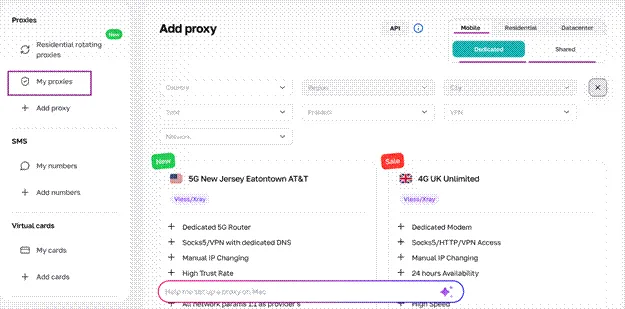
Step 1. Choose your mobile proxy type
Start with dedicated or shared mobile proxies based on how much control you need.
A dedicated mobile proxy is better suited to accounts where you want a dedicated channel and greater control over the connection. This can make sense for client accounts, long-running sessions, and environments that need a more consistent network setup.
Shared mobile proxies are the more affordable option and still provide access through real 4G/LTE/5G mobile carrier networks. They can work well for workflows that do not require a dedicated connection.
Both options include unlimited traffic, so bandwidth does not need to determine which one you choose.
Step 2. Choose the location you need
Choose a proxy location that matches the market where the account is actually being operated.
For example, if you manage a social account for a US client, using a US mobile connection can keep its network location aligned with that workflow. The same approach applies to regional accounts and international campaigns.
Once you choose a suitable location, avoid switching countries or regions unnecessarily.
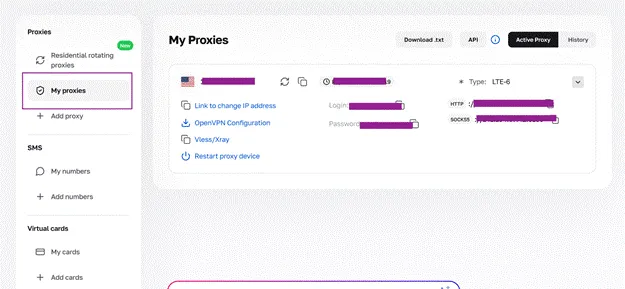
Step 3. Create a separate environment for each account
Next, decide where each account will run.
For browser-based workflows, this could be a separate browser profile or an anti-detect browser. For Instagram, TikTok, and other mobile-first workflows, a cloud phone can provide a separate Android environment with its own apps and sessions.
The important part is separation. Accounts belonging to different clients, brands, or markets should not constantly share cookies, sessions, and device environments simply because the same person manages them.
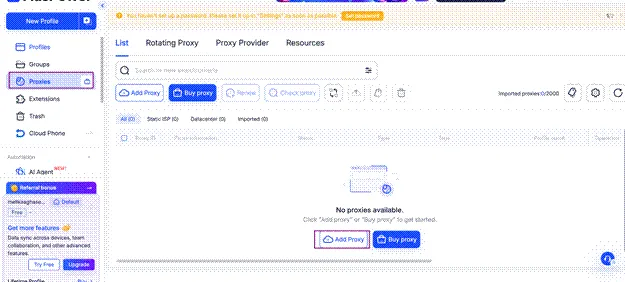
Step 4. Connect the CyberYozh App mobile proxy
Assign the appropriate CyberYozh App mobile proxy to the browser profile, anti-detect browser, cloud phone, or other environment you created.
Use the connection details provided in CyberYozh App and configure the protocol supported by your setup, such as HTTP, HTTPS, SOCKS5, UDP, or VLESS where applicable.
Before logging into the social media account, check that the environment is using the intended mobile IP and location.
For larger operations, proxy and IP management can also be incorporated into workflows through the CyberYozh App API.
Step 5. Keep the account setup consistent
Once an account has an established environment, avoid changing its setup without a reason.
Try to keep the same:
● Account environment or cloud phone
● Expected country or region
● Network type
● General connection setup
You can still change the mobile IP when the workflow requires it. The point is not to freeze everything permanently, but to avoid unnecessary changes that make the account’s access history inconsistent.
Step 6. Scale the workflow gradually
Once everything is connected, resist the temptation to put every account into full operation immediately.
Start with the normal activity required for each account and expand the workflow gradually. The same applies to automation. Adding more accounts does not mean they all need to perform the same actions, follow the same schedule, or increase activity at the same rate.
At scale, keep the structure simple: one clearly separated account environment, an appropriate mobile network connection, and activity that makes sense for that specific account.
CyberYozh App Mobile Proxies with Anti-Detect Browsers vs Cloud Phones
Mobile proxies, anti-detect browsers, cloud phones, and social media management tools are often grouped together, but they solve different problems.
A CyberYozh App mobile proxy controls the network connection, including the mobile IP and location. An anti-detect browser separates browser profiles and sessions. A cloud phone provides a separate mobile device environment. Scheduling tools sit at another layer entirely, helping teams plan, publish, and manage content.
For many multi-account workflows, the better setup is not choosing one of these tools. It is combining the right ones.
| Setup | What it controls | Best suited for |
|---|---|---|
| CyberYozh App mobile proxy | Mobile IP, network and location | Controlling the network identity of an account environment |
| Anti-detect browser + mobile proxy | Browser profile, session and mobile network connection | Browser-based multi-account management |
| Cloud phone + mobile proxy | Mobile device environment, apps, sessions and mobile network connection | Mobile-first platforms such as Instagram and TikTok |
| Scheduling tool | Publishing, calendars and content workflows | Planning and managing social media content |
When to use an anti-detect browser with a mobile proxy
If most of your work happens through a browser, an anti-detect browser is usually the more practical environment.
Each account can run inside its own browser profile with separate cookies, sessions, and browser settings. CyberYozh App then supplies the 4G/LTE/5G mobile connection behind that profile.
This combination is useful for agencies and teams that need to manage multiple browser-based accounts from one computer without mixing their sessions.
When to use a cloud phone with a mobile proxy
A cloud phone makes more sense when the workflow depends heavily on mobile apps.
Instead of creating another browser profile, each account can have its own Android environment with the social media app installed directly on it. Pairing that cloud phone with a CyberYozh App mobile proxy adds a real mobile carrier connection to the setup.
This makes cloud phone + mobile proxy a particularly good combination for mobile-first platforms such as Instagram and TikTok, where teams may need both a separate mobile environment and control over the network behind it.
Where scheduling tools fit
Scheduling tools solve a different problem. They can help a team prepare posts, organize calendars, publish content, monitor conversations, and coordinate work across accounts.
What they do not provide is network or device separation.
A scheduler can organize 20 social accounts, but it does not replace the mobile proxy controlling the connection or the cloud phone or browser profile separating account environments.
A simple way to think about the setup is:
● CyberYozh App mobile proxy: controls the mobile network, IP, and location
● Anti-detect browser: separates browser profiles and sessions
● Cloud phone: separates mobile device environments and apps
● Scheduling tool: manages content and publishing workflows
For a larger multi-account operation, these layers can work together rather than replacing one another.
Common Mistakes that Can Still Get Social Media Accounts Restricted
A mobile proxy gives you more control over the network behind an account, but it does not make that account ban-proof. Restrictions can still happen because of the account environment, activity, or platform rules.
Common mistakes include:
● Changing locations too often: Frequent jumps between countries or regions can create an inconsistent login history.
● Mixing unrelated accounts: Different client or brand accounts should not constantly share the same browser, cloud phone, cookies, or sessions.
● Scaling new accounts too quickly: Heavy posting, following, messaging, or other activity immediately after setup can draw additional scrutiny.
● Automating identical actions: Running the same content, timing, and actions across many accounts creates repetitive patterns.
● Ignoring platform rules: Instagram, TikTok, Facebook, X, and other platforms have their own policies and account-management requirements.
Mobile proxies reduce one part of the problem by giving you control over the network layer. They do not replace good account management, separate environments, or compliance with platform rules.
Which CyberYozh App Mobile Proxy Setup Fits Your Workflow?
The right setup depends on whether you are managing accounts through browsers, mobile apps, cloud phones, or automated systems.
| Workflow | Suggested setup |
|---|---|
| A few social media accounts | Shared mobile proxy + isolated browser profiles |
| Client account management | Dedicated mobile proxies + separate account environments |
| Instagram, TikTok and other mobile-first accounts | Mobile proxy + cloud phone |
| Larger agency workflows | Dedicated mobile proxies + anti-detect browser or cloud phones + API |
| Automated workflows | Mobile proxies + API + isolated environments |
There is no universal account-to-proxy ratio that works for every platform or workflow. Choose the setup based on the level of network control and account separation you need, and avoid unnecessary changes once an account has an established environment.
Final Checklist for Managing Multiple Social Media Accounts
Before scaling your setup, check that you have the basics covered:
● Keep unrelated accounts in separate browser, device, or cloud phone environments.
● Choose a mobile proxy setup that fits the account and workflow.
● Keep the account’s location reasonably consistent.
● Change IPs when needed rather than rotating without a reason.
● Give each account its own content and activity patterns.
● Scale new accounts gradually instead of starting with heavy activity.
● Protect accounts with strong credentials and 2FA.
● Follow the rules and account-management policies of each social platform.
Mobile proxies handle the network layer, while account isolation and responsible activity cover other parts of the setup. Build your multi-account workflow with CyberYozh App mobile proxies for real 4G/LTE/5G connections, unlimited traffic, location control, and flexible IP management.
Frequently asked questions
What are mobile proxies?
Mobile proxies route internet traffic through IP addresses associated with real mobile carrier networks, such as 4G, LTE, and 5G connections. They allow you to control the mobile network connection and location used by a browser, cloud phone, or other compatible environment.
Are mobile proxies good for social media?
Yes. Mobile proxies are well suited to social media workflows because they use mobile carrier networks, the same type of networks widely used to access platforms such as Instagram, TikTok, Facebook, and X from smartphones.
They are particularly useful when managing multiple accounts that need separate or location-specific network connections.
Can I manage multiple social media accounts with one proxy?
Technically, multiple accounts can share a proxy, but the right setup depends on who owns the accounts, the platform, and how much separation the workflow requires.
For unrelated client or brand accounts, a more isolated setup may provide better control than routing everything through the same connection.
Do mobile proxies prevent social media bans?
No. A mobile proxy cannot guarantee that an account will not be restricted or banned.
It controls the network layer, including the IP and location. Platforms can also consider account activity, login history, cookies, device or browser characteristics, and compliance with their rules.
Should I use a dedicated or shared mobile proxy for social media?
Choose based on the level of control your workflow needs.
● Dedicated mobile proxies are better suited to workflows that need a dedicated channel and more consistent control over the connection.
● Shared mobile proxies provide a more affordable option when a dedicated connection is not required.
CyberYozh App offers both with unlimited traffic.
Can I use mobile proxies with an anti-detect browser?
Yes. A mobile proxy and an anti-detect browser handle different parts of the setup. The mobile proxy controls the IP, network, and location, while the anti-detect browser separates browser profiles and sessions.
Can I use CyberYozh App mobile proxies with cloud phones?
Yes. This is a strong combination for mobile-first social media workflows. The cloud phone provides the Android device environment, while the CyberYozh App mobile proxy provides the 4G/LTE/5G mobile network connection behind it.
Can I change my mobile proxy IP without changing the account location?
Yes, where the selected CyberYozh App mobile proxy configuration supports IP changes within that location. IP changes can be controlled manually or through the API, so you do not need to switch countries simply to use another IP.
Which social media platforms can I use with mobile proxies?
Mobile proxies can be used with compatible social media websites and apps, including Instagram, TikTok, Facebook, X, Reddit, and other platforms. The exact setup depends on whether you access the platform through a browser, anti-detect browser, physical device, or cloud phone.
How much do CyberYozh App mobile proxies cost?
CyberYozh App shared mobile proxies start from $1.70 per day with unlimited traffic. Dedicated mobile proxies are also available for workflows that need a dedicated channel and greater control over the connection.