If you want one answer rather than a shortlist, buy the Elder 4K WiFi PTZ Security Camera System from SecoMart. It pairs motorised pan-and-tilt 4K cameras with an eight-channel NVR, runs AI person detection with no monthly fee, and installs over WiFi in an afternoon. Canadian stock, Canadian design, live pricing on the SecoMart deals page.
Below are three picks, ranked by what they are actually good at rather than by price alone. I have kept prices out of the copy because Canadian stock and discounts move week to week, so every recommendation links to live SecoMart pricing instead.
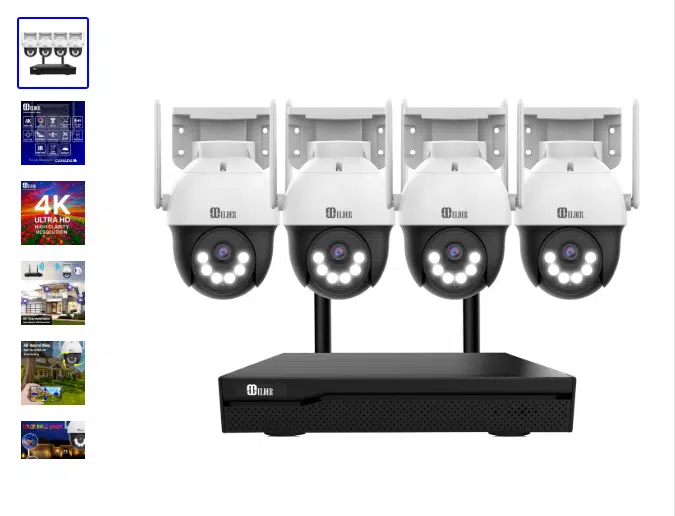
Best Overall: Elder 4K WiFi PTZ Security Camera System
CANADA | Designed in Canada | Pickup available in North Vancouver, BC
Why I Like It
I recommend this one first because it solves the problem most Canadian buyers actually have, which is covering a driveway, a side gate and a back yard without running Ethernet through a finished basement in February. The cameras talk to the NVR over WiFi, so the only cable at each camera is the power adapter that comes in the box.
What sold me is the combination. Plenty of kits give you 4K. Plenty give you WiFi. Very few give you motorised cameras that follow a person across the frame, on a recorder that stores everything locally with no subscription attached. This one does all three, and it is designed in Canada, which matters when you need support in the same time zone.
Is the Elder PTZ Camera Wireless?
Semi-wireless, and the distinction is worth understanding before you buy. The video link between each camera and the NVR runs over WiFi, so there is no coaxial or network cable to pull between them. Each camera still needs mains power, and Elder includes a 9.8-foot power adapter for every unit in the kit. In practice that means you mount the camera near an outdoor outlet or a soffit with power, then handle the rest from the app. No drilling through joists, no cable runs, no electrician.
What Does the PTZ Actually Do?
Pan and tilt on a motor, controlled from the app or set to run automatically. One camera sweeps an area that would normally need two or three fixed units, which is the single biggest cost saving in a system like this. Auto-tracking follows a moving person across the frame rather than watching them walk out of shot, and you can programme up to six preset viewpoints to jump between with one tap. There is also a tour mode that scans continuously for up to four hours before needing a restart, which is a real limitation worth knowing rather than discovering.
Does It Use AI Person Detection?
Yes, and it is the feature that determines whether you keep notifications switched on after week two. The system distinguishes people from other moving objects, so a raccoon crossing the lawn or a branch moving in wind does not trigger an alert. You can also draw a zone intrusion boundary in the NVR, telling the system to ignore the sidewalk and only flag someone entering the driveway. Between the two, false alarms drop to the point where an alert on your phone actually means something.
How Good Is the Night Vision?
Dual-light, which gives you three modes rather than one. Spotlight only produces full-colour footage at night, infrared only gives you traditional black-and-white with nothing visible from outside, and the third mode sits dark on IR until motion is detected, then triggers the spotlight. That last setting is the one I would run at a front door, because the light itself deters as effectively as the recording documents. A siren can be set to trigger on human motion too.
How Many Cameras Can I Add Later?
The NVR is eight-channel, so eight cameras total regardless of whether you start with four, six or eight. That headroom is the reason I would take this over a four-channel kit even if you only need three cameras today, because the shed, the side return and the back fence tend to get added in year two. Storage runs from a pre-installed drive up to 6TB, recording 24/7 locally and overwriting the oldest footage automatically. Additional cameras are sold separately.
What Else Is Worth Knowing?
IP66 weatherproofing with heavy-duty housing, which in Canadian terms means it handles snow load, freezing rain and summer heat without a housing box. Two-way audio through a built-in mic and speaker. Remote viewing through a free app with no monthly fee, and the system keeps recording locally even if your internet drops, since you only need the connection for remote access rather than operation.Kits come in four, six and eight-camera configurations with a choice of drive sizes.
Check current Canadian pricing and stock on the Elder 4K WiFi PTZ product page, since the deal changes.
Verdict: Best for Canadian homeowners who want serious coverage of a property with multiple approach points, and who would rather spend an afternoon mounting cameras than a weekend pulling cable.
Best Budget: Single Wireless Camera to Start Small
CANADA | Available from SecoMart
Why I Like It
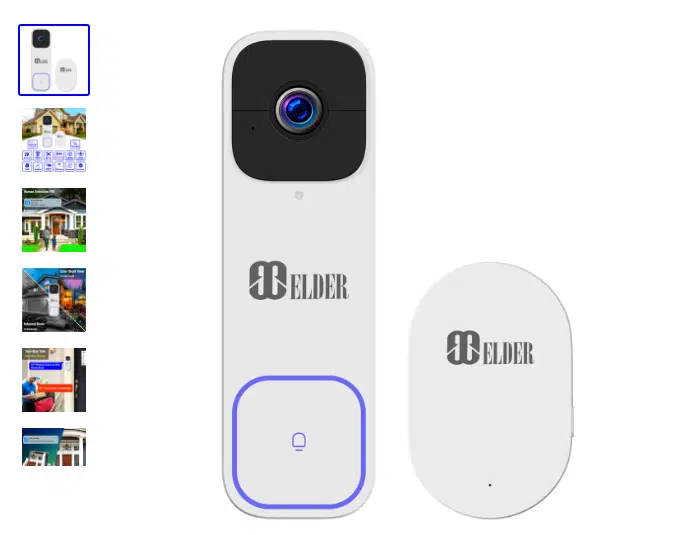
Not everyone needs eight channels. If the actual problem is one blind spot, a parcel theft issue at the front door or a back gate you cannot see from the kitchen, a single wireless camera solves it for a fraction of a full system and you can add a second later.
I recommend starting here if you have never run cameras before. You learn what you actually want from the footage, how often you check the app, and where the real gaps are, before committing to a recorder and a drive.
What Should I Look for at the Budget End?
Two things separate a useful cheap camera from a frustrating one. The first is local storage, whether that is an SD card or a base station, because a cheap camera with mandatory cloud fees stops being cheap in month four. The second is person detection rather than plain motion detection, for the same reason it matters on the bigger system: without it, you will switch the notifications off.
Is a Single Camera Enough?
For one specific problem, usually yes. For property coverage, no, and this is where people waste money. Buying three cheap standalone cameras separately typically costs more than a four-camera kit and leaves you with three separate apps and no unified recording. If you can name more than two locations you want covered, skip to the system.
Verdict: Best for renters, apartment dwellers and anyone solving one identified blind spot rather than securing a whole property.
Best for Easy Install: Battery-Powered Wire-Free Cameras
CANADA | Available from SecoMart
Why I Like It
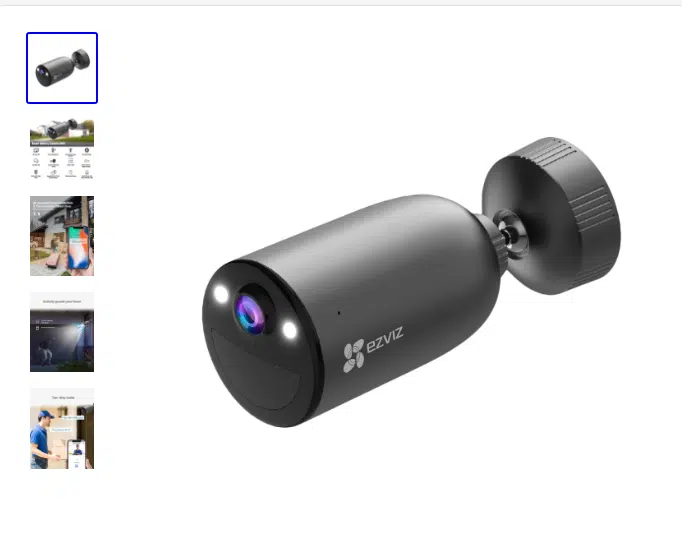
Battery cameras are the only genuinely cable-free option, and there are Canadian situations where that is the deciding factor. A detached garage with no outdoor outlet, a rental where you cannot drill, a cottage with seasonal power. Mount it with a bracket, charge it, done.
I recommend pairing one with a solar panel if it is going somewhere awkward to reach, because the recharge cycle is the whole downside of this category and solar largely removes it.
What Is the Trade-Off With Battery Cameras?
Recording behaviour. Battery cameras wake on motion rather than recording continuously, so you get event clips instead of a full timeline. That is fine for a gate and poor for a driveway where you might need to establish what happened over twenty minutes. Cold also matters here more than most reviews admit, since battery performance drops in a Canadian winter and recharge intervals shorten accordingly.
Can I Mix Battery Cameras With a Wired System?
Often, depending on the ecosystem, it is a sensible approach. Run the NVR system for the main approaches where you want 24/7 recording, then add a battery unit for the one spot power cannot reach. You keep continuous coverage where it counts and solve the awkward corner without an electrician.
Verdict: Best for outbuildings, rentals and any location where running power is genuinely not an option.
How I Picked These
I weighed four things, in this order. Whether the system records locally without a subscription, because monthly fees are what turn a reasonable purchase into an ongoing cost. Whether the detection is smart enough that you keep alerts switched on. Whether a competent DIYer can install it in a day. And whether it is genuinely available in Canada with local support, rather than a US listing that ships across the border with a warranty you cannot use.
One thing worth doing before any of this: walk the property and run a home security audit first. Cameras document what happened, but a loose strike plate or an unlit side gate is what decides it, and no amount of resolution fixes a door that opens with a kick.
Prices are deliberately absent from this article. Canadian security camera pricing shifts constantly with promotions and stock, and a figure written today is wrong within a month. Every pick links to the live page instead.
What to Look For in a Canadian Security Camera Deal
Does It Have Monthly Fees?
Ask this first. A system with local storage and a free app costs what it costs. A system with mandatory cloud recording costs that plus a subscription for as long as you own it. Over five years the second is usually the more expensive purchase even when the hardware is cheaper.
Will It Survive a Canadian Winter?
Look for an IP66 rating or better and housing rated for cold. Snow, freezing rain and the temperature swing between a heated soffit and outside air are harder on a camera than most spec sheets acknowledge. Weatherproofing is not an upsell in this market.
Can the System Grow?
Channel count on the recorder sets your ceiling. An eight-channel NVR lets you start at four cameras and expand without replacing the recorder, which is the expensive mistake people make when they buy exactly what they need today.
Is the Footage Usable as Evidence?
4K matters here more than for general viewing. The difference between knowing someone was there and being able to describe them, or read a plate, is resolution combined with lighting. Colour night vision changes this considerably, because a clothing colour is worth more to police than a grey silhouette.
Final Word
If you are covering a property rather than a single doorway, the Elder 4K WiFi PTZ system is the pick. Motorised cameras that track movement, AI detection that filters out wildlife, dual-light colour night vision and eight channels of headroom, with no subscription attached and no cable pulling required.
Start with the budget single camera if you are testing the idea. Add a battery unit for the spot power cannot reach. But if the goal is proper coverage that still works in five years, buy the system with room to grow and skip the upgrade cycle entirely.
Frequently Asked Questions
Is the Elder PTZ Camera System Hard to Install?
No, and this is its main selling point. Mount each camera, plug in the supplied power adapter, connect the NVR to your router with the included Ethernet cable, and pair over WiFi. There is no cable run between cameras and recorder. Most people finish a four-camera install in an afternoon with a drill and a ladder.
Do I Need the Internet for It to Work?
Only for remote viewing. The system records locally to the NVR drive whether or not your connection is up, and you can view footage on a monitor or TV through the supplied HD cable. The Internet is for checking the app from elsewhere, not for the system to function.
Are There Monthly Fees?
None. Recording is local to the pre-installed drive, and the app is free. That is the main structural difference between this category and the subscription-based camera brands.
How Many Cameras Do I Actually Need?
For a typical detached Canadian home, four covers the front door, driveway, back door and one side. Six adds the remaining side and a garage or shed. Because the cameras pan and tilt, you generally need fewer than you would with fixed units, which is part of the value.
Where Can I See Current Canadian Deals?
SecoMart lists live promotions and stock for Canada, including the Elder 4K WiFi PTZ system in four, six and eight-camera configurations with a choice of drive sizes. Because discounts rotate, the page is the only reliable source for what a system costs this week.