Creating compelling visuals used to require years of training or expensive software. That reality is quickly changing. Artificial intelligence now empowers anyone to generate stunning, unique images from simple text descriptions.
This guide provides a complete walkthrough of how you can start creating with AI today.
We’ll cover the entire process, from crafting the perfect idea to refining your final image. You’ll learn the techniques needed to turn your imagination into high-quality visuals for your business, personal projects, or social media.
How to Create Images with AI: A Step-by-Step Guide
The process of generating images with AI is straightforward and accessible. By following these steps, you can guide the technology to produce visuals that align perfectly with your vision. It all starts with a clear concept and a well-written prompt.
Step 1: Define Your Core Concept
Before you write a single word, you need a clear idea of what you want to create. Think like an art director. What is the subject of your image? Where is it located? What is the mood or atmosphere? Consider the color palette, lighting, and overall style. The more detailed your initial concept is, the better the AI can interpret it.
For example, instead of just thinking “a dog,” try envisioning “a happy golden retriever puppy playing in a field of flowers during a sunny afternoon.” This level of detail sets you up for success.
Step 2: Choose Your AI Generator
With your concept ready, the next step is to select a platform to bring it to life. Many powerful tools are available directly in your web browser, removing the need for complex installations.
You can easily find a Free AI Image Generator Online that allows you to start experimenting immediately without any financial commitment.
These tools provide a user-friendly interface where you can input your text prompts and see results in seconds, making them perfect for beginners and professionals alike.
Step 3: Write a Powerful and Descriptive Prompt
The prompt is the most important part of the entire process. It’s your direct instruction to the AI. A great prompt is specific, descriptive, and clear. Start with the main subject, then add details about the environment, style, lighting, and composition.
Think in terms of adjectives and adverbs. Use phrases like “highly detailed,” “cinematic lighting,” or “impressionist oil painting” to guide the AI’s aesthetic choices.
A simple prompt like “car on a road” will produce a generic image, but a detailed one like “a vintage red sports car driving on a coastal road at sunset, photorealistic, golden hour” will generate something far more specific and impressive.
Step 4: Generate and Refine Your Image
Once you enter your prompt, the AI will process your request and generate an image. Your first result might be good, but it often serves as a starting point. From here, you can iterate.
You might tweak your prompt by adding, removing, or changing words to get closer to your goal. Sometimes, you may get a great image that just needs a few adjustments.
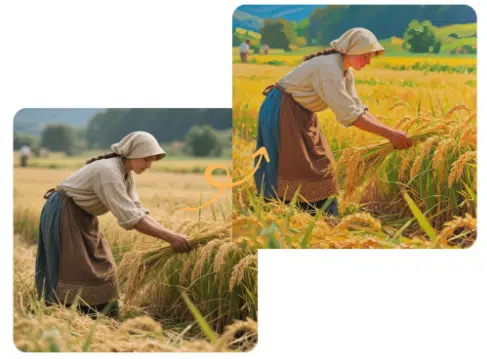
In these cases, a free image to image generator is incredibly useful. This feature allows you to upload an existing picture and use text prompts to modify it, giving you another layer of creative control.
Step 5: Download and Use Your Creation
After you’ve refined the image to your satisfaction, the final step is to download it. Most AI generators offer different resolution options. Choose the highest quality available for your needs, especially for print or professional use.
Be sure to review the usage rights for the images you create.
Many platforms allow for commercial use, but it’s always wise to confirm. You now have a unique, AI-generated visual ready for your website, presentation, or creative project.
Tips and Best Practices for Better Results
Getting great results from AI image generators involves a mix of art and science. While the technology is powerful, a few best practices can dramatically improve the quality of your creations.
Be Extremely Specific
Vague prompts lead to generic images. The key to unlocking the AI’s full potential is detail. Instead of “a woman,” specify “a young woman with long auburn hair, wearing a green velvet dress, standing in an enchanted forest.”
Add details about the artistic style, such as “in the style of Monet” or “3D render.” The more specific you are, the more unique and tailored your image will be.
Use Negative Prompts to Exclude Elements
Sometimes, telling the AI what you *don’t* want is just as important as telling it what you do. Negative prompts are commands that exclude specific elements or qualities from your image.
For example, if you’re creating a professional photograph, you might add a negative prompt like “cartoon, painting, text, watermark” to ensure the output is clean and realistic. This helps you steer the AI away from common mistakes or undesired styles.
Experiment with Different Styles
Don’t limit yourself to one aesthetic. AI image generators can mimic almost any artistic style imaginable. Try prompts that include terms like “cyberpunk,” “watercolor,” “art deco,” “minimalist line art,” or “photorealistic.”
Experimenting with different styles is a great way to discover new creative possibilities and find the perfect look for your project. Keep a list of styles you like so you can use them again in the future.
Iterate and Build on Your Successes
Your first attempt will rarely be your last. Treat image generation as an iterative process. When a prompt gives you a result you like, save it. Use it as a base for future creations, changing small details to see how the output is affected.
This process of continuous refinement will not only improve your images but also deepen your understanding of how the AI interprets your words.
Common Mistakes to Avoid
As you explore AI image creation, you may encounter some common hurdles. Being aware of these pitfalls can help you troubleshoot issues and achieve better outcomes more quickly.
Writing Vague or Contradictory Prompts
The most common mistake is providing prompts that are too simple or confusing. A prompt like “a magical world” is too broad for the AI to create a focused image.
Similarly, a prompt with contradictory terms, such as “a bright, dark room,” will confuse the generator. Aim for clarity and logical consistency in your descriptions to give the AI a clear path to follow.
Ignoring the Aspect Ratio
The shape of your image matters. A landscape-style image (16:9) is great for website banners, while a square image (1:1) is perfect for social media profiles.
Most AI generators allow you to set the aspect ratio before you create your image. Forgetting to set this can result in awkwardly cropped subjects or compositions that don’t fit your intended use case.
Expecting Perfect Human Anatomy
While AI has improved significantly, it can still struggle with complex details like hands and feet. It’s common to see images with an incorrect number of fingers or oddly positioned limbs.
Be prepared to generate multiple variations or use negative prompts like “extra fingers” to try and fix these issues. Patience and a willingness to regenerate are key.
Not Saving Your Winning Prompts
When you finally craft a prompt that produces a fantastic image, save it immediately. It’s easy to forget the exact combination of words that led to your success. Keep a simple document or note where you log your best prompts.
This creates a personal library you can reference later, saving you time and helping you replicate successful styles consistently.
Conclusion
AI is fundamentally changing the landscape of digital creativity. It has transformed image creation from a specialized skill into an accessible tool for everyone.
By understanding how to craft detailed prompts, refine your results, and avoid common mistakes, you can unlock a nearly infinite source of unique visuals.
This technology is more than just a novelty, it’s a new partner in the creative process. As AI continues to evolve, it will only become more integrated into our workflows, offering even more exciting possibilities for the future.