
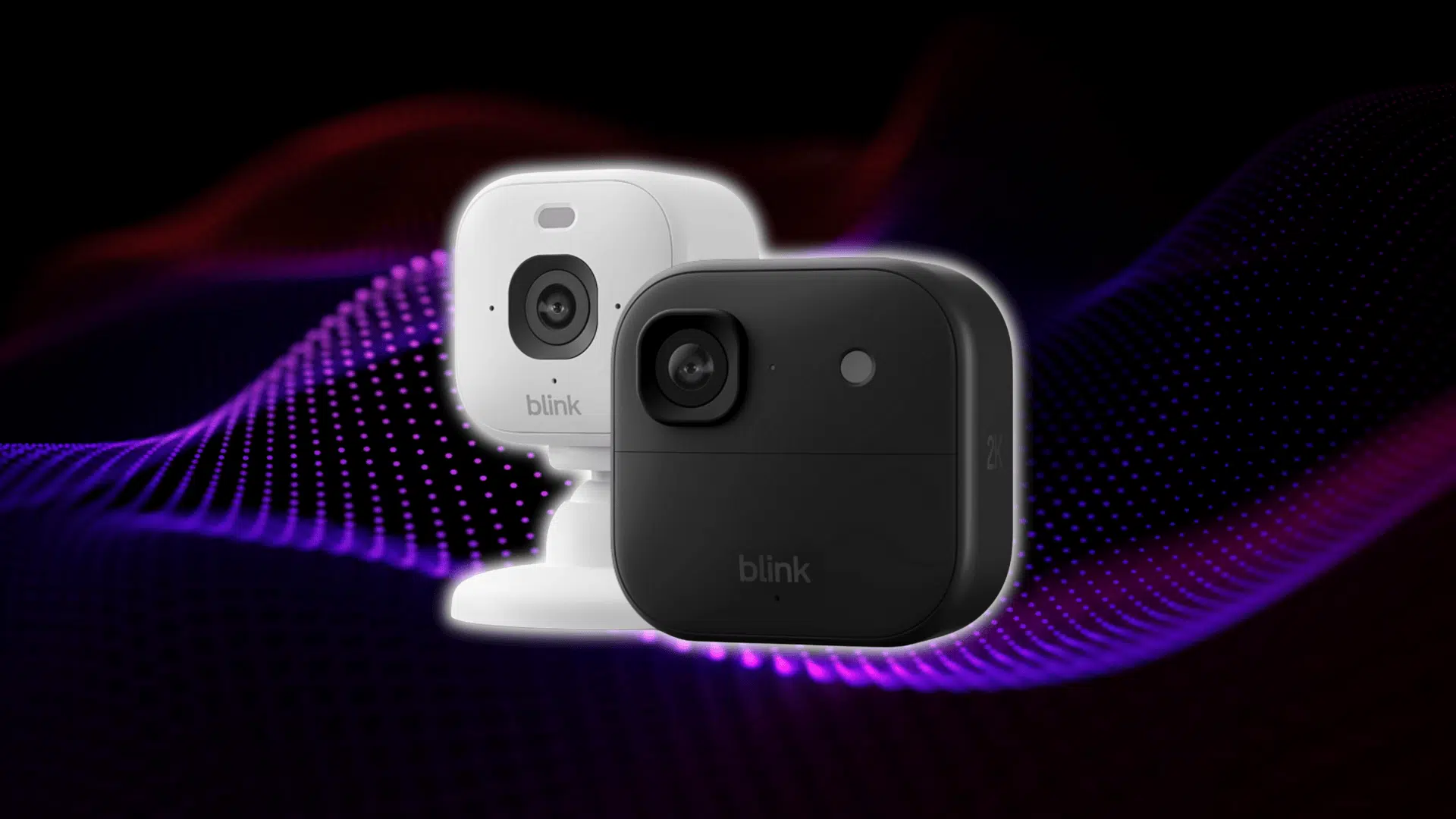
Blink’s been around for a while now. People know it as the cheaper camera brand. Simple setup. Long battery life. Nothing fancy. That’s the reputation. And honestly, that’s why a lot of people look at it in the first place. It feels like the “good enough” option if you don’t want to spend a ton.
But their new models threw people off a bit. Outdoor 4, Outdoor 2K+, Mini 2K+, color night vision, different fields of view, subscription changes… it’s a lot.
Everyone’s trying to figure out if these updates actually make Blink better, or if it still sits in that entry-level lane. Half the reviews say it’s amazing for the price. The other half say it misses motion and struggles at night.
This review sorts all that out because, honestly, the lineup is a little messy right now. Let’s start with the basics.
Here’s Where I Land on Blink Cameras
If you want something simple and cheap that mostly just works, Blink makes sense. That’s really the whole pitch. It’s best in basic setups where motion is predictable. Front doors. Small porches. Indoor rooms. Stuff like that.
But.. What about long driveways? Plate capture? Big yards with weird angles? Yeah, Blink starts to fall apart there. The sensors just aren’t built for that kind of tracking. You’ll miss things coming straight at the camera, and details get lost fast, especially at night.
Battery life is still one of Blink’s strongest points. The outdoor models don’t burn through power. If you don’t get tons of motion events, the batteries last way longer than most people expect.
Just keep in mind the subscription thing. If you want person detection, longer clips, or more storage, you’re paying monthly. Blink works without it, but the experience feels pretty limited.
Let’s Go Through the Blink Camera Models One by One

Most people know Blink has a bunch of different cameras now, but the naming gets messy fast. Here’s a simple breakdown of each one so you can see what they do and where they make sense:
1. Outdoor 4
The Outdoor 4 is Blink’s standard outdoor camera, and it’s meant for simple setups where you just want basic coverage without messing around. It runs on AA batteries and usually lasts a long time if motion isn’t constant.
Daytime video looks fine, but nighttime video depends heavily on nearby light. It’s easy to mount, easy to manage, and good for entry-level use.
2. Outdoor 2K+
The Outdoor 2K+ is basically Blink trying to step out of “budget only” territory. The jump to 2K resolution makes a noticeable difference, especially when you’re trying to make out faces or clothing details.
Color night vision also helps when there’s at least a little ambient light. It still won’t read plates in a dark driveway, but clarity is definitely a level up.
3. Mini 2K+
The Mini 2K+ is the indoor camera that feels like a real upgrade. It’s compact but surprisingly sharp, and the wider field of view makes a big difference in rooms or hallways.
If you just want something inside that captures clear footage without spending a ton, this one hits the sweet spot. It handles indoor lighting changes better than older Blink Minis.
4. Mini 2
The Mini 2 is Blink’s familiar entry-level indoor camera. It’s affordable, small, and gives you a basic 1080p picture that works well enough for general monitoring.
You’re not getting the clarity or field of view of the 2K+ model, but for simple indoor checks… pets, kids, whatever, it does its job without fuss. It’s the “don’t overthink it” option.
5. Floodlight Options
Blink’s floodlight accessories make a bigger difference than people expect. The regular IR night vision on Blink cameras struggles in dark yards, so adding a floodlight gives you usable footage instead of grainy shadows.
It’s motion-activated, bright enough to help with clarity, and makes the cameras far more reliable at night. Without it, outdoor footage can feel hit or miss.
6. Sync Module 2
The Sync Module 2 is the hub that keeps everything stable. It handles local USB storage, reduces Wi-Fi strain, and helps the cameras stay connected across the house.
Placement matters a lot here. Too far from the cameras, and things start dropping out. When it’s placed right, the whole system feels smoother and more responsive, especially with multiple cameras running.
Video Quality of Blink Cameras: Day vs. Night Testing
Blink’s video quality is kind of a mixed bag. The Outdoor 4 and Outdoor 2K+ look similar at first, but once you compare them in real scenes, the 2K+ clearly has the edge.
During the day, both cameras look fine, but the 2K+ just pulls more detail. Faces look sharper, edges look cleaner, and the extra resolution actually shows up in normal use. The Outdoor 4 isn’t bad, just softer.
Night is where things separate fast. The Outdoor 4 leans on basic IR night vision, which ends up grainy and washed out. The 2K+ has color night mode, and it looks better, but only if there’s a bit of ambient light.
In full darkness, neither camera can handle things like plates or small details. One user summed it up:
“Clear picture, wider view, but I still couldn’t make out the plate numbers on cars driving by.”
So the simple takeaway: daytime is solid on both, but nighttime needs lighting if you want anything more than motion alerts. With light, the 2K+ finally looks like a real upgrade. Without it, both behave like older Blink cams.
Blink’s Motion Detection: The Truth
Blink uses PIR motion sensors, which react to heat changes. That’s the whole reason it struggles with straight-on movement. When someone walks directly toward the lens, the heat pattern barely shifts, so the camera reacts late or sometimes not at all. Side-to-side motion triggers much faster.
- The best placement is off to the side, aimed across the area instead of straight down it.
- Driveways, walkways, and yards all work better with a cross-angle.
- Keep the camera around chest height and tilt it slightly down so the sensor catches more movement.
For settings, bump upsensitivity, tighten activity zones, and turn onearly alerts. Small tweaks make a noticeable difference with Blink’s sensors.
Blink is a bad choice when you need consistent tracking in tougher spots like long driveways, fast cars, big open yards, or anything where you’re expecting the camera to catch fine detail or quick movement. It’s built for simple paths, porches, and predictable traffic, not complex layouts.
Let’s Talk About Field of View & Audio
Blink’s cameras don’t all see the same amount of space.
- The Mini 2 is the widest at 143°, which works well indoors because it catches more of a room without you having to angle it perfectly.
- The Mini 2K+ is close, but the outdoor models pull back a bit.
- The Outdoor 4 and Outdoor 2K+ sit in the more typical range, so they feel tighter by comparison. Good for focused areas, not wide yards.
Audio is pretty simple. Blink mics soundclear enough for normal use, but they don’t have a lot of depth.
The 2K+ models pick up voices a little cleaner, while the Outdoor 4 can sound a bit thinner. None of them feels premium, but they’re easy to understand and work fine for quick check-ins or two-way talk.
Battery Life: Real-World Results
Blink’s outdoor models are known for long battery life, but real numbers depend on motion frequency, clip length, Wi-Fi strength, and cold weather. More motion equals faster drain. Weak Wi-Fi drains even faster because the camera keeps trying to reconnect.
Real users on Reddit report anywhere from 2–6 months in busy areas to close to a year in low-traffic spots. The “up to two years” claim only happens when the camera barely records anything.
Typical Battery Life Use – Claimed vs. Actual:
| Model | Claimed Battery Life | Real-World Battery Life |
|---|---|---|
| Outdoor 4 | Up to 2 years | 3–12 months |
| Outdoor 2K+ | Up to 2 years | 2–9 months |
If your camera faces a street, expect the low end. If it’s on a quiet porch, you’ll see better results.
Night Vision Performance of Blink’s Cameras
Blink’s night vision leans heavily on lighting. The IR LEDs on the Outdoor 4 can only do so much. In dark areas with no ambient light, footage gets grainy, flat, and loses detail fast. You’ll catch movement, but not much else.
A floodlight changes everything. Blink’s floodlight attachment adds enough brightness to make nighttime clips actually usable. If your yard or driveway is dark, you’ll want some kind of light no matter which model you buy.
The Outdoor 2K+ looks better because of color night vision, but it still needs ambient light to work. With a porch light or streetlight, it’s a clear upgrade. In full darkness, it drops back to IR and behaves closer to the Outdoor 4.
Here’s the simple breakdown:
| Model | Night Mode Type | In Low Light | In Complete Darkness |
|---|---|---|---|
| Outdoor 4 | IR Night Vision | Usable but soft detail | Grainy; faces/details unclear |
| Outdoor 2K+ | Color Night Vision + IR | Much clearer; better colors | Drops to IR; similar to Outdoor 4 |
If you need clear faces, license plates, or reliable nighttime detail, Blink needs either added lighting or a property with existing ambient light. Without that, both cameras hit the same limits.
Installation, Connectivity, and Sync Module Placement
Blink setup is fast. Most people finish in 5–10 minutes. The app handles the steps, so there’s not much to figure out.
Most problems come frommounting mistakes, such as cameras placed too high, pointed straight down a walkway, or stuck behind obstacles. Those angles weaken motion detection and slow the sensor.
Connectivity issues usually come from weak WiFi. Blink cameras don’t have a strong range, so long distances, thick walls, or metal siding cause drops and missed clips.
The Sync Modulehelps, but only if it’s placed right. Keep it central, elevated, and in the open. Ideally, it should sit midway between your router and the cameras. Hidden placement leads to unstable connections.
Storage Options: Local vs. Subscription
Blink gives you two ways to save clips: USB local storage through the Sync Module 2, or the paid Blink subscription.
Local storage is simple; you plug in a USB drive, and the system saves clips directly to it. No fees. The main downside is that clips aren’t as quick to access, and you don’t get smart detection features.
The cloud plans add more convenience. Blink’s Basic plan covers one camera. The Plus plan covers all cameras in your system. Both add better clip history, smart alerts, and easier viewing.
Here’s what you lose without a subscription:
| Feature | With Subscription | Without Subscription |
|---|---|---|
| Clip Storage | Cloud | USB Only |
| Person Detection | Yes | No |
| Extended Clip History | Yes | Limited |
| Rapid Access to Clips | Yes | Slower |
| Tap-to-View Notifications | Yes | No |
| Multiple Camera Coverage | Plus Plan Only | Yes (local only) |
So,are Blink cameras worth it without the paid plan? They’re fine for simple setups where you just want basic recording and don’t care about smart detection. If you expect better alerts, cleaner notifications, and longer clip history, the subscription makes the system feel more complete.
Blink vs. Competitors (Ring, Nest, Eufy, Wyze)

Blink sits in a different spot than the other brands. It’s cheaper, easier to set up, and built for simple coverage.
Ring and Nest lean into smarter detection and better apps. Eufy focuses on strong local storage without monthly fees. Wyze tries to pack in features for low cost.
Here’s the quick side-by-side so you can see where each one lands:
| Brand | Price | Video Quality | Motion Detection | Local Storage | Night Vision |
|---|---|---|---|---|---|
| Blink | Low | Good (2K+) | Basic | Yes (USB) | Basic/Needs Light |
| Ring | Mid | Good/Very Good | Advanced | Limited | Better |
| Nest | High | Very Good/Excellent | Advanced | Limited | Better |
| Eufy | Mid | Good | Good | Yes (Strong) | Better |
| Wyze | Low | Good | Good | Yes | Better |
Who should pick Blink?
If you want simple setup, long battery life, and the lowest price with local storage, Blink still makes sense.
Who should pick others?
If you need smarter motion detection, better night video, deep app features, or integrations with other smart gear, Ring, Nest, Eufy, or Wyze will give you more.
Blink isn’t bad. It’s just built for easy and cheap, not for the most capable overall system.
Common Problems & Fixes
- Motion detection misses: Usually caused by straight-on movement or bad angles. Shift the camera to a cross-angle and raise sensitivity.
- WiFi drop issues: Blink’s range is limited. Move the Sync Module closer or reduce walls/obstacles between the camera and router.
- Poor night vision: IR alone isn’t enough in dark areas. Add a floodlight or use spots with ambient light for clearer clips.
- Blurry footage: Happens when the camera sits too far from the subject or faces glare. Reposition, lower the mount, or cut reflections.
- Delayed notifications: Often tied to weak WiFi or long clip settings. Improve signal strength and shorten clip length to speed alerts.
Most of these issues come down to placement, lighting, or WiFi strength. When those three things are dialed in, Blink feels a lot more reliable and the whole system runs smoother.
Wrapping Up
Blink cameras make the most sense if you want something simple that doesn’t take over your whole setup. They’re not trying to compete with the heavy hitters, and that’s fine as long as you know what you’re getting into.
The real advantage is how low-maintenance the system feels once everything is placed right. Good WiFi, decent lighting, and smart angles go a long way.
If you keep expectations realistic, a Blink camera review always comes back to the same idea: solid value for basic coverage.
Check out the other guides on the site if you want more straightforward tips to level up your home security setup.









2 Responses
The new Outdoor4 XR+ cameras provide great coverage between 200-400 ft away. You’ll also need the Sync 2 module to connect.
Blink is a fraud.
First battery can hardly last for a year, I already had to replace it before 1 year of use.
Second subscription is a rip off, I mean 1 camera 50$ and 2 for 150$ per year.
Third for the last week or so my sync module keeps dropping off Wi Fi and after multiple attempts of re register and in plug and reset and everything NO success.
Wouldn’t recommend this product